Templates · Settings screens · Education app · Leaf
Leaf Display screen
A settings screen from Leaf, an e-books and reading app template in a Minimal style. Screen 8 of 25.
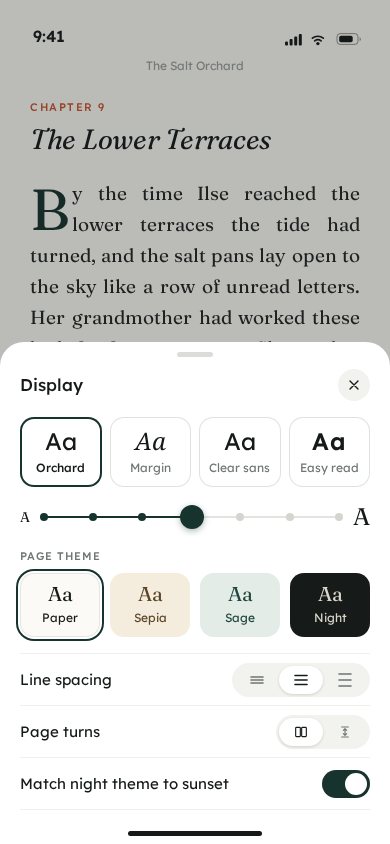
Leaf is a complete e-book and reading app: welcome, taste picker and sign in, a home that picks up where you left off, a library of covers with progress, a serif reader with its menu, display sheet, contents, highlights, dictionary, notebook and notes, narration with a synced page, the store, search, a book page with checkout and a purchased screen, an author page, reading stats, a membership plan, notifications, profile and settings. Paper white and pine green with an apricot ribbon.
| Detail | Value |
|---|---|
| Screen type | Settings |
| App | Leaf: E-books and reading |
| Category | Education |
| Design language | Minimal, light |
| Type | Fraunces for headings, Lexend for text |
| Colours | #f5f5f1 background, #ffffff surface, #151a19 text, #6f7674 text-muted, #ef7d57 accent, #151a19 accent-contrast, #17332e secondary, #e5e6e1 border, #d6452f danger |
What this screen says
- The Salt Orchard
- Chapter 9
- The Lower Terraces
- B y the time Ilse reached the lower terraces the tide had turned, and the salt pans lay open to the sky like a row...
- Page 212 of 331 14 min left in chapter 64%
- Display
- AaOrchard
- AaMargin
- AaClear sans
- AaEasy read
- Page theme
- AaPaper
- AaSepia
- AaSage
- AaNight
- Line spacing
- Page turns
- Match night theme to sunset
Around it in Leaf
More settings screens
- Studyhall Settings: Free lessons and practice for school
- Tutor Settings: Book online tutors for any skill
- Almanac Settings: The free encyclopedia reader
- Tiles Settings: Daily word and number puzzles
- Stacks Settings: Borrow e-books and audiobooks from your library
- Penpal Settings: Language exchange chat
- Lexis Settings: A word a day
- Quanta Settings: Interactive physics lessons
- Cram Settings: Exam prep and mock tests
- Quad Settings: University campus app
- Palm Settings: Learn sign language
- Epoch Settings: History on a timeline
Every education app settings screen
What makes a good settings screen
- Group options into clear sections. Account, notifications, privacy, appearance and help, with headings, so people scan to the right group.
- Label settings by their effect. "Daily reminder at 8:00" is clearer than "Reminders". Add a short description under options that need one.
- Use the right control. Toggles for on and off, a row that opens a list for choices, and sliders only for ranges.
- Apply changes immediately. Most mobile settings take effect when changed, with no Save button to forget.
The full settings screen guide and every example
Remix Leaf free: describe your own app and it is drawn in this design. Or get its files from $10: Figma, React Native, SwiftUI, Flutter and HTML.