Templates · Settings screens · Education app · Tiles
Tiles Settings screen
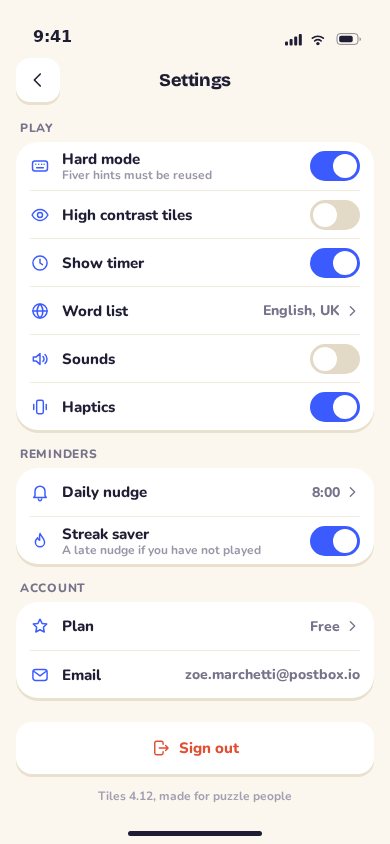
A settings screen from Tiles, a daily word and number puzzles app template in a Playful style. Screen 25 of 25.
Tiles is a complete daily puzzle app: welcome, picking your daily mix, sign in, a Today hub with four puzzles and your streak, Fiver (a five letter word in six tries) with its keyboard, a solved screen, guess stats and a shareable result card, Huddle (sort sixteen words into four sets) and its solved board, Crossbit (a five by five mini crossword), Bullseye (hit a target number with six tiles) and its how to play, the archive calendar, themed puzzle packs, overall stats, leagues with a daily leaderboard and a new league form, a Plus plan with checkout, notifications, profile and settings.
| Detail | Value |
|---|---|
| Screen type | Settings |
| App | Tiles: Daily word and number puzzles |
| Category | Education |
| Design language | Playful, light |
| Type | Bricolage Grotesque for headings, Nunito for text |
| Colours | #fbf7ef background, #ffffff surface, #1f1d33 text, #77738a text-muted, #3b5bff accent, #ffffff accent-contrast, #ff6a4d secondary, #ece4d4 border, #e04f33 danger |
What this screen says
- Settings
- Play
- Hard modeFiver hints must be reused
- High contrast tiles
- Show timer
- Word listEnglish, UK
- Sounds
- Haptics
- Reminders
- Daily nudge8:00
- Streak saverA late nudge if you have not played
- Account
- PlanFree
- Emailzoe.marchetti@postbox.io
- Sign out
- Tiles 4.12, made for puzzle people
Around it in Tiles
More settings screens
- Cram Settings: Exam prep and mock tests
- Quad Settings: University campus app
- Palm Settings: Learn sign language
- Epoch Settings: History on a timeline
- Wren Settings: Early reading for kids
- Proof Settings: Maths tutor that shows its working
- Skim Settings: Speed reading trainer
- Terra Settings: Geography and flags quiz
- Gambit Settings: Chess training
- Buzzer Settings: Live trivia
- Homeroom Settings: School, all on one page
- Parla Settings: Language learning
Every education app settings screen
What makes a good settings screen
- Group options into clear sections. Account, notifications, privacy, appearance and help, with headings, so people scan to the right group.
- Label settings by their effect. "Daily reminder at 8:00" is clearer than "Reminders". Add a short description under options that need one.
- Use the right control. Toggles for on and off, a row that opens a list for choices, and sliders only for ranges.
- Apply changes immediately. Most mobile settings take effect when changed, with no Save button to forget.
The full settings screen guide and every example
Remix Tiles free: describe your own app and it is drawn in this design. Or get its files from $10: Figma, React Native, SwiftUI, Flutter and HTML.