Templates · Success and confirmation screens · Productivity app · Tunnel
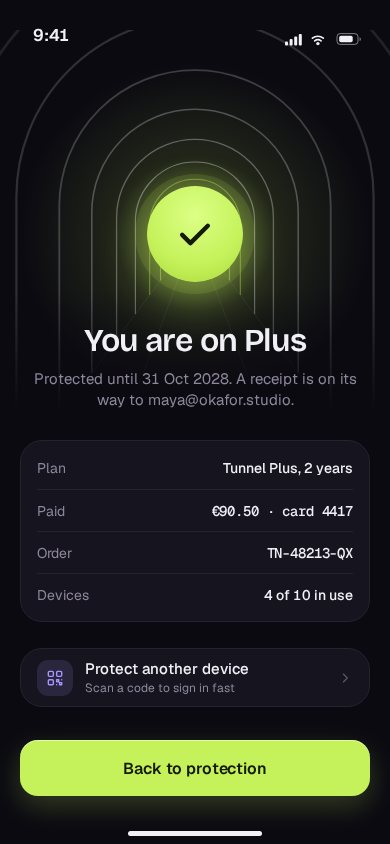
Tunnel Plan active screen
A success screen from Tunnel, a VPN and online privacy app template in a Dark-first style. Screen 22 of 25.
Tunnel is a complete VPN and privacy app: welcome, sign in and VPN permission, a one tap connect home inside a glowing tunnel, the connecting handshake, a dot matrix server map, a country list and a country with its cities, live connection details, specialty servers and double hop, protocols, kill switch, split tunnelling, threat protection with a blocked log, a data breach monitor and a leak, a speed test, plans, checkout and a success screen, notifications, account and settings. Aubergine black and plum graphite with signal lime and lavender.
| Detail | Value |
|---|---|
| Screen type | Success |
| App | Tunnel: VPN and online privacy |
| Category | Productivity |
| Design language | Dark-first, dark |
| Type | Bricolage Grotesque for headings, Geist for text |
| Colours | #0b0a11 background, #16141e surface, #f2f0f7 text, #8d879b text-muted, #c5f25a accent, #141a05 accent-contrast, #a796ff secondary, #26222f border, #ff6b5b danger |
What this screen says
- You are on Plus
- Protected until 31 Oct 2028. A receipt is on its way to maya@okafor.studio.
- Plan Tunnel Plus, 2 years
- Paid €90.50 · card 4417
- Order TN-48213-QX
- Devices 4 of 10 in use
- Protect another deviceScan a code to sign in fast
- Back to protection
Around it in Tunnel
More success and confirmation screens
- Glance Order placed: Visual search with the camera
- Replay Video ready: Record and share screen videos
- Easel Invite sent: Collaborative whiteboard
- Token Account added: Two-factor codes and sign-in approvals
- Beam Sent: Send big files
- Parchment Invite sent: Documents, edit and share
- Lectern Exported: Slides and presenter remote
- Ringer Call ended: Phone, contacts and voicemail
- Pipeline Deal won: Sales CRM on the road
- Aim Check in saved: Goals and key results
- Scribe Shared: Voice memos to notes
- Inkline Signed: Sign and send contracts
Every productivity app success screen
What makes a good confirmation screen
- Confirm in the headline. "Payment sent", "Table booked for Friday at 8" or "Lesson complete" in plain words, with a clear success colour or icon.
- Repeat the key details. Amount, date, reference number or score, so people do not need to check elsewhere that the right thing happened.
- Say what happens next. When the order arrives, when the money lands, when the next lesson unlocks.
- Offer the next step. Track the order, add to calendar, share, or start the next lesson. One primary action and a way back home.
The full confirmation screen guide and every example
Remix Tunnel free: describe your own app and it is drawn in this design. Or get its files from $10: Figma, React Native, SwiftUI, Flutter and HTML.