Templates · Booking and checkout screens · Productivity app · Tunnel
Tunnel Checkout screen
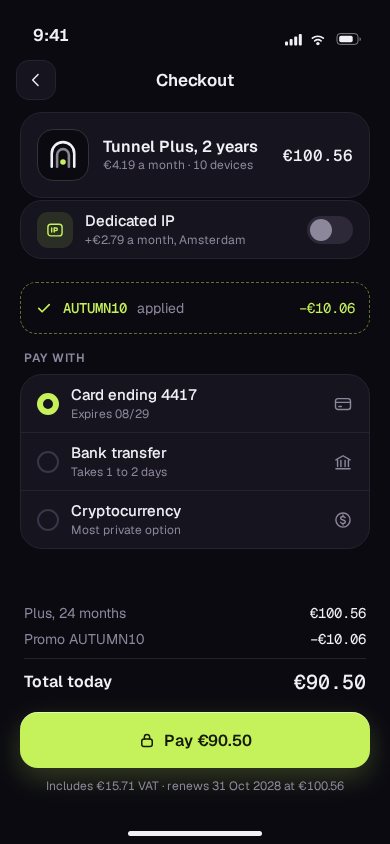
A checkout screen from Tunnel, a VPN and online privacy app template in a Dark-first style. Screen 21 of 25.
Tunnel is a complete VPN and privacy app: welcome, sign in and VPN permission, a one tap connect home inside a glowing tunnel, the connecting handshake, a dot matrix server map, a country list and a country with its cities, live connection details, specialty servers and double hop, protocols, kill switch, split tunnelling, threat protection with a blocked log, a data breach monitor and a leak, a speed test, plans, checkout and a success screen, notifications, account and settings. Aubergine black and plum graphite with signal lime and lavender.
| Detail | Value |
|---|---|
| Screen type | Checkout |
| App | Tunnel: VPN and online privacy |
| Category | Productivity |
| Design language | Dark-first, dark |
| Type | Bricolage Grotesque for headings, Geist for text |
| Colours | #0b0a11 background, #16141e surface, #f2f0f7 text, #8d879b text-muted, #c5f25a accent, #141a05 accent-contrast, #a796ff secondary, #26222f border, #ff6b5b danger |
What this screen says
- Checkout
- Tunnel Plus, 2 years€4.19 a month · 10 devices
- Dedicated IP+€2.79 a month, Amsterdam
- AUTUMN10applied −€10.06
- Pay with
- Card ending 4417Expires 08/29
- Bank transferTakes 1 to 2 days
- CryptocurrencyMost private option
- Plus, 24 months €100.56
- Promo AUTUMN10 −€10.06
- Total today €90.50
- Pay €90.50
- Includes €15.71 VAT · renews 31 Oct 2028 at €100.56
Around it in Tunnel
More booking and checkout screens
- Opal Invoice: Studio dashboard
- Chrono Send invite: World clock, timers and stopwatch
- Frontdesk Refund: Customer support inbox
- Campaign Schedule: Email marketing campaigns
- Outpost Schedule: Schedule social posts
- Polish Checkout: Writing assistant and keyboard
- Tapline Send a tip: Link-in-bio pages and analytics
- Quill Checkout: Docs, wikis and databases in one workspace
- Tandem Review plan: Team chat, channels and huddles
- Shipyard Upgrade: Issue tracking for product teams
- Canvas Checkout: Design files and comments on mobile
- Merge: Code, pull requests and reviews
Every productivity app checkout screen
What makes a good checkout screen
- Show the total early and honestly. Taxes, delivery and service fees should appear before the last step. A higher total on the final screen feels like a trick.
- Offer wallet payments. Apple Pay and Google Pay skip card typing entirely. Show them first when they are available.
- Ask for the minimum. Only the fields needed to deliver or book. Save details for next time.
- Let people review before paying. A clear summary of items, dates, address and price, with each part editable without starting over.
The full checkout screen guide and every example
Remix Tunnel free: describe your own app and it is drawn in this design. Or get its files from $10: Figma, React Native, SwiftUI, Flutter and HTML.