Templates · List and feed screens · Productivity app · Tunnel
Tunnel Notifications screen
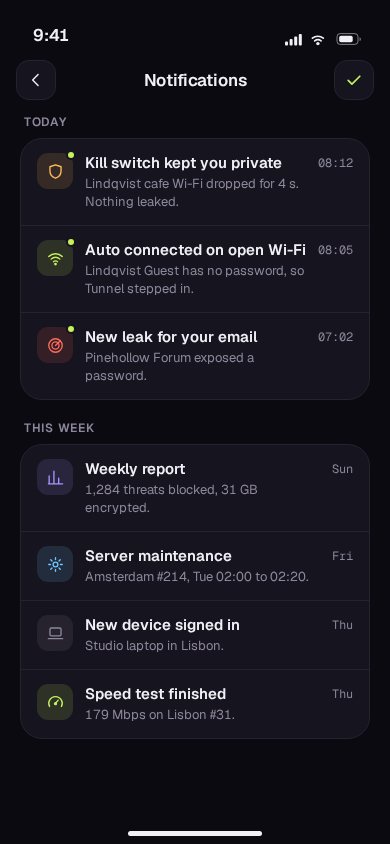
A list screen from Tunnel, a VPN and online privacy app template in a Dark-first style. Screen 23 of 25.
Tunnel is a complete VPN and privacy app: welcome, sign in and VPN permission, a one tap connect home inside a glowing tunnel, the connecting handshake, a dot matrix server map, a country list and a country with its cities, live connection details, specialty servers and double hop, protocols, kill switch, split tunnelling, threat protection with a blocked log, a data breach monitor and a leak, a speed test, plans, checkout and a success screen, notifications, account and settings. Aubergine black and plum graphite with signal lime and lavender.
| Detail | Value |
|---|---|
| Screen type | List |
| App | Tunnel: VPN and online privacy |
| Category | Productivity |
| Design language | Dark-first, dark |
| Type | Bricolage Grotesque for headings, Geist for text |
| Colours | #0b0a11 background, #16141e surface, #f2f0f7 text, #8d879b text-muted, #c5f25a accent, #141a05 accent-contrast, #a796ff secondary, #26222f border, #ff6b5b danger |
What this screen says
- Notifications
- Today
- Kill switch kept you private
- Lindqvist cafe Wi-Fi dropped for 4 s. Nothing leaked.
- Auto connected on open Wi-Fi
- Lindqvist Guest has no password, so Tunnel stepped in.
- New leak for your email
- Pinehollow Forum exposed a password.
- This week
- Weekly report
- 1,284 threats blocked, 31 GB encrypted.
- Sun
- Server maintenance
- Amsterdam #214, Tue 02:00 to 02:20.
- Fri
- New device signed in
- Studio laptop in Lisbon.
- Thu
- Speed test finished
- 179 Mbps on Lisbon #31.
Around it in Tunnel
More list and feed screens
- Pomo Notifications: Focus timer
- Postbox Swipe actions: Email for busy teams
- Daybook Day: Calendar and planner
- Scanly Notifications: Document scanner
- Keyring Logins: Password manager
- Rota Notifications: Shift scheduling for hourly teams
- Inkwell Prompts: Daily journal
- Shortlist Notifications: Job search and application tracker
- Parley Add members: Team messenger
- Docket Notifications: Task and sprint planner
- Kanso Notifications: Tasks, calendar and chat
- Margin Notebooks: AI note taking
Every productivity app list screen
What makes a good list screen
- Show what people need to decide. Each row should carry just enough to choose: a title, one or two details and a status. Everything else belongs on the detail screen.
- Keep rows consistent. The same information in the same place on every row lets people scan down a column instead of reading each item.
- Group with headings. Dates, categories or status headings break long lists into chunks people can skip through.
- Make common actions quick. Swipe actions, a checkbox or a heart on the row save opening the item for small tasks.
The full list screen guide and every example
Remix Tunnel free: describe your own app and it is drawn in this design. Or get its files from $10: Figma, React Native, SwiftUI, Flutter and HTML.