Templates · Settings screens · Productivity app · Tunnel
Tunnel Kill switch screen
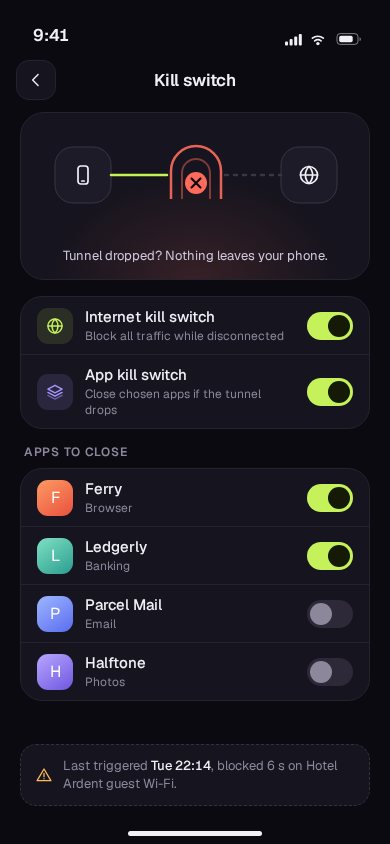
A settings screen from Tunnel, a VPN and online privacy app template in a Dark-first style. Screen 13 of 25.
Tunnel is a complete VPN and privacy app: welcome, sign in and VPN permission, a one tap connect home inside a glowing tunnel, the connecting handshake, a dot matrix server map, a country list and a country with its cities, live connection details, specialty servers and double hop, protocols, kill switch, split tunnelling, threat protection with a blocked log, a data breach monitor and a leak, a speed test, plans, checkout and a success screen, notifications, account and settings. Aubergine black and plum graphite with signal lime and lavender.
| Detail | Value |
|---|---|
| Screen type | Settings |
| App | Tunnel: VPN and online privacy |
| Category | Productivity |
| Design language | Dark-first, dark |
| Type | Bricolage Grotesque for headings, Geist for text |
| Colours | #0b0a11 background, #16141e surface, #f2f0f7 text, #8d879b text-muted, #c5f25a accent, #141a05 accent-contrast, #a796ff secondary, #26222f border, #ff6b5b danger |
What this screen says
- Kill switch
- Tunnel dropped? Nothing leaves your phone.
- Internet kill switchBlock all traffic while disconnected
- App kill switchClose chosen apps if the tunnel drops
- Apps to close
- FerryBrowser
- LedgerlyBanking
- Parcel MailEmail
- HalftonePhotos
- Last triggered Tue 22:14, blocked 6 s on Hotel Ardent guest Wi-Fi.
Around it in Tunnel
More settings screens
- Margin Settings: AI note taking
- Aide Settings: Executive AI assistant
- Juno Settings: AI chat assistant
- Opal Settings: Studio dashboard
- Jot Settings: Quick notes and checklists
- Chrono Settings: World clock, timers and stopwatch
- Frontdesk Settings: Customer support inbox
- Campaign Settings: Email marketing campaigns
- Outpost Settings: Schedule social posts
- Pageview Settings: Website analytics
- Polish Settings: Writing assistant and keyboard
- Tapline Settings: Link-in-bio pages and analytics
Every productivity app settings screen
What makes a good settings screen
- Group options into clear sections. Account, notifications, privacy, appearance and help, with headings, so people scan to the right group.
- Label settings by their effect. "Daily reminder at 8:00" is clearer than "Reminders". Add a short description under options that need one.
- Use the right control. Toggles for on and off, a row that opens a list for choices, and sliders only for ranges.
- Apply changes immediately. Most mobile settings take effect when changed, with no Save button to forget.
The full settings screen guide and every example
Remix Tunnel free: describe your own app and it is drawn in this design. Or get its files from $10: Figma, React Native, SwiftUI, Flutter and HTML.