Templates · Settings screens · Productivity app · Tapline
Tapline Settings screen
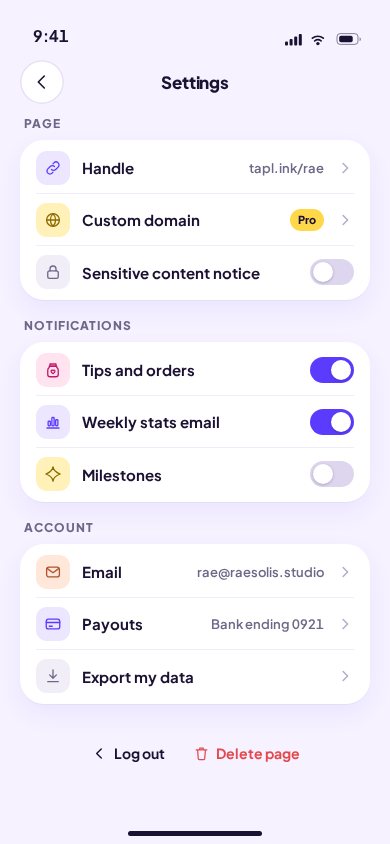
A settings screen from Tapline, a link-in-bio pages and analytics app template in a Gen Z style. Screen 25 of 25.
Tapline is a complete link-in-bio app: claim a handle, sign up, a page home with today's numbers, links you drag to reorder, add and edit a link, themes and button styles, social icons, the public page as a visitor sees it, a shop with products, a tip jar with a visitor tip checkout and thank you, subscribers, analytics, audience, live visitors, a QR code, a Pro plan, activity, profile and settings. Lavender milk and white with ink outlines, ultraviolet, bubblegum pink and sun yellow.
| Detail | Value |
|---|---|
| Screen type | Settings |
| App | Tapline: Link-in-bio pages and analytics |
| Category | Productivity |
| Design language | Gen Z, light |
| Type | Unbounded for headings, Plus Jakarta Sans for text |
| Colours | #f6f2ff background, #ffffff surface, #1b1233 text, #6e6787 text-muted, #5b3cff accent, #ffffff accent-contrast, #ff4f9a secondary, #ffd84a highlight, #e7e0f5 border, #e5484d danger |
What this screen says
- Settings
- Page
- Handle tapl.ink/rae
- Custom domain Pro
- Sensitive content notice
- Notifications
- Tips and orders
- Weekly stats email
- Milestones
- Account
- Email rae@raesolis.studio
- Payouts Bank ending 0921
- Export my data
- Log out Delete page
Around it in Tapline
More settings screens
- Merge Settings: Code, pull requests and reviews
- Query Settings: AI answers with sources
- Glossa Settings: Translate text, voice and camera
- Layout Settings: Design anything from templates
- Tick Settings: To-do lists and reminders
- Beacon Left behind: Find your devices and people
- Staffroom Settings: HR, payslips and time off
- Slot Settings: Booking links and meeting scheduling
- Sheet Settings: Spreadsheets and databases
- Tunnel Protocol: VPN and online privacy
- Ping Settings: Internet speed test
- Glance Settings: Visual search with the camera
Every productivity app settings screen
What makes a good settings screen
- Group options into clear sections. Account, notifications, privacy, appearance and help, with headings, so people scan to the right group.
- Label settings by their effect. "Daily reminder at 8:00" is clearer than "Reminders". Add a short description under options that need one.
- Use the right control. Toggles for on and off, a row that opens a list for choices, and sliders only for ranges.
- Apply changes immediately. Most mobile settings take effect when changed, with no Save button to forget.
The full settings screen guide and every example
Remix Tapline free: describe your own app and it is drawn in this design. Or get its files from $10: Figma, React Native, SwiftUI, Flutter and HTML.