Templates · Settings screens · Productivity app · Frontdesk
Frontdesk Settings screen
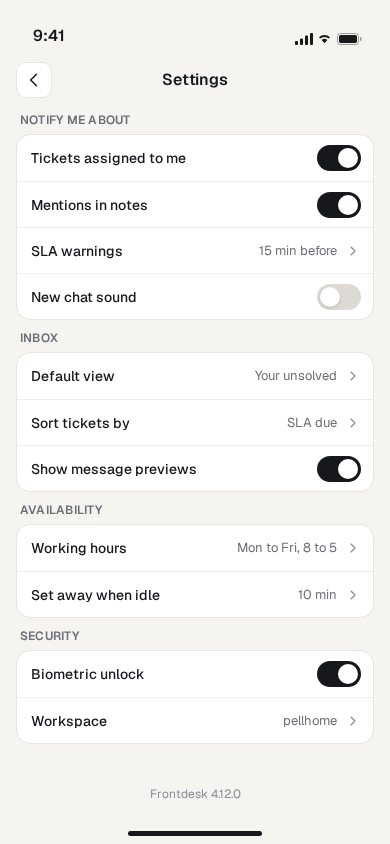
A settings screen from Frontdesk, a customer support inbox app template in an Enterprise style. Screen 25 of 25.
Frontdesk is a complete support agent app: welcome, sign in, a home with your queue and tickets at risk, saved views, an inbox sorted by SLA, a ticket thread with internal notes, the customer card, a reply with macros, mentions, assign and tag, a solved screen, live chats with a running conversation, a voice call with a live transcript, search, the customer's order with a partial refund, team performance, satisfaction ratings, the team, notifications, a Pro plan, profile and settings. Warm paper and white with ink and marigold.
| Detail | Value |
|---|---|
| Screen type | Settings |
| App | Frontdesk: Customer support inbox |
| Category | Productivity |
| Design language | Enterprise, light |
| Type | Geist |
| Colours | #f5f4f0 background, #ffffff surface, #17181c text, #6e6f78 text-muted, #f4b324 accent, #17181c accent-contrast, #17181c secondary, #e7e5df border, #d93a3a danger |
What this screen says
- Settings
- Notify me about
- Tickets assigned to me
- Mentions in notes
- SLA warnings 15 min before
- New chat sound
- Inbox
- Default view Your unsolved
- Sort tickets by SLA due
- Show message previews
- Availability
- Working hours Mon to Fri, 8 to 5
- Set away when idle 10 min
- Security
- Biometric unlock
- Workspace pellhome
- Frontdesk 4.12.0
Around it in Frontdesk
More settings screens
- Deskly Settings: Hybrid office booking
- Pomo Settings: Focus timer
- Postbox Settings: Email for busy teams
- Daybook Settings: Calendar and planner
- Scanly Settings: Document scanner
- Keyring Autofill: Password manager
- Rota Settings: Shift scheduling for hourly teams
- Inkwell Settings: Daily journal
- Shortlist Settings: Job search and application tracker
- Parley Settings: Team messenger
- Docket Settings: Task and sprint planner
- Kanso Settings: Tasks, calendar and chat
Every productivity app settings screen
What makes a good settings screen
- Group options into clear sections. Account, notifications, privacy, appearance and help, with headings, so people scan to the right group.
- Label settings by their effect. "Daily reminder at 8:00" is clearer than "Reminders". Add a short description under options that need one.
- Use the right control. Toggles for on and off, a row that opens a list for choices, and sliders only for ranges.
- Apply changes immediately. Most mobile settings take effect when changed, with no Save button to forget.
The full settings screen guide and every example
Remix Frontdesk free: describe your own app and it is drawn in this design. Or get its files from $10: Figma, React Native, SwiftUI, Flutter and HTML.