Templates · Settings screens · Productivity app · Aide
Aide Settings screen
A settings screen from Aide, an executive AI assistant app template in a Dark-first style. Screen 25 of 25.
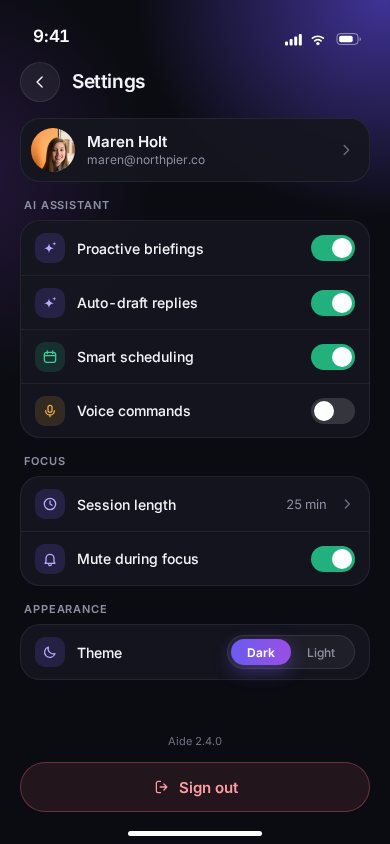
Aide is a complete AI chief of staff app: welcome, account and verification, connecting calendar and mail, a home with the daily briefing and agenda timeline, voice and typed commands, an inbox triaged with summaries and ready drafts, meeting briefs with overlap fixes, tasks and delegation, a focus timer, travel and documents at a glance, weekly insights, a plan screen, profile and settings. Near-black with a violet aurora, emerald status marks and amber warnings.
| Detail | Value |
|---|---|
| Screen type | Settings |
| App | Aide: Executive AI assistant |
| Category | Productivity |
| Design language | Dark-first, dark |
| Type | Inter |
| Colours | #0b0c12 background, #15161f surface, #f4f4f8 text, #8d90a3 text-muted, #7c5cf2 accent, #ffffff accent-contrast, #34d399 secondary, #262836 border, #f26d78 danger |
What this screen says
- Settings
- Maren Holt
- maren@northpier.co
- AI assistant
- Proactive briefings
- Auto-draft replies
- Smart scheduling
- Voice commands
- Focus
- Session length 25 min
- Mute during focus
- Appearance
- Theme
- DarkLight
- Aide 2.4.0
- Sign out
Around it in Aide
More settings screens
- Kanso Settings: Tasks, calendar and chat
- Margin Settings: AI note taking
- Juno Settings: AI chat assistant
- Opal Settings: Studio dashboard
- Jot Settings: Quick notes and checklists
- Chrono Settings: World clock, timers and stopwatch
- Frontdesk Settings: Customer support inbox
- Campaign Settings: Email marketing campaigns
- Outpost Settings: Schedule social posts
- Pageview Settings: Website analytics
- Polish Settings: Writing assistant and keyboard
- Tapline Settings: Link-in-bio pages and analytics
Every productivity app settings screen
What makes a good settings screen
- Group options into clear sections. Account, notifications, privacy, appearance and help, with headings, so people scan to the right group.
- Label settings by their effect. "Daily reminder at 8:00" is clearer than "Reminders". Add a short description under options that need one.
- Use the right control. Toggles for on and off, a row that opens a list for choices, and sliders only for ranges.
- Apply changes immediately. Most mobile settings take effect when changed, with no Save button to forget.
The full settings screen guide and every example
Remix Aide free: describe your own app and it is drawn in this design. Or get its files from $10: Figma, React Native, SwiftUI, Flutter and HTML.