Templates · Home screens · Productivity app · Stash
Stash Home screen
A home screen from Stash, a productivity app template in a Neubrutalism style. Screen 4 of 25.
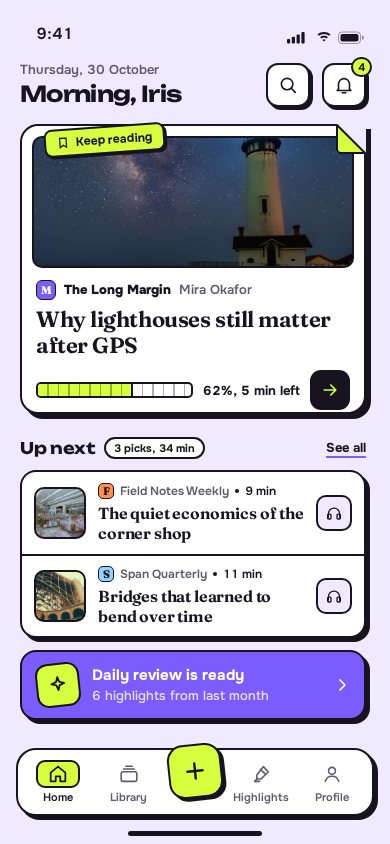
Stash is a complete read-it-later app: welcome, interests and sign in, a home with the article you are halfway through and what is up next, a library with collections, full text search, a reader with highlights and notes, display settings, listening with a waveform player, a highlights feed, shareable quote cards, collections, saving a link with a stashed confirmation, a daily review of old highlights, reading stats, a newsletter inbox, a publication page, a Plus plan with checkout, notifications, profile and settings. Lilac paper, ink borders and hard shadows, with lime highlighter kept for what you saved, what is selected and the main action.
| Detail | Value |
|---|---|
| Screen type | Home |
| App | Stash: Read-it-later and highlights |
| Category | Productivity |
| Design language | Neubrutalism, light |
| Type | Unbounded for headings, Onest for text |
| Colours | #efeaff background, #ffffff surface, #17141f text, #5f5a6e text-muted, #d6ff3d accent, #17141f accent-contrast, #7a5cff secondary, #17141f border, #ff5a4e danger |
What this screen says
- Thursday, 30 October
- Morning, Iris
- Keep reading
- MThe Long MarginMira Okafor
- Why lighthouses still matter after GPS
- 62%, 5 min left
- Up next 3 picks, 34 min
- See all
- FField Notes Weekly9 min
- The quiet economics of the corner shop
- SSpan Quarterly11 min
- Bridges that learned to bend over time
- Daily review is ready
- 6 highlights from last month
- Home
- Library
- Highlights
- Profile
Around it in Stash
More home screens
- Shipyard Home: Issue tracking for product teams
- Canvas Recents: Design files and comments on mobile
- Merge Home: Code, pull requests and reviews
- Query Home: AI answers with sources
- Glossa Translate: Translate text, voice and camera
- Layout Home: Design anything from templates
- Tick Today: To-do lists and reminders
- Beacon People: Find your devices and people
- Staffroom Home: HR, payslips and time off
- Slot Home: Booking links and meeting scheduling
- Sheet Home: Spreadsheets and databases
- Tunnel Home: VPN and online privacy
Every productivity app home screen
What makes a good home screen
- Put the most important thing first. Decide the one thing most people come for, like today's workout, a balance or the next booking, and give it the top of the screen.
- Make it feel current. Greetings with the time of day, today's date, fresh numbers and recent activity tell people the app is alive and about them.
- Keep quick actions within thumb reach. The two or three things people do most should be one tap away, in the lower part of the screen or a floating button.
- Group related content in clear sections. Use headings and spacing so the screen scans as a few blocks, not a long mixed list.
The full home screen guide and every example
Remix Stash free: describe your own app and it is drawn in this design. Or get its files from $10: Figma, React Native, SwiftUI, Flutter and HTML.