Templates · Settings screens · Lifestyle app · Splice
Splice Settings screen
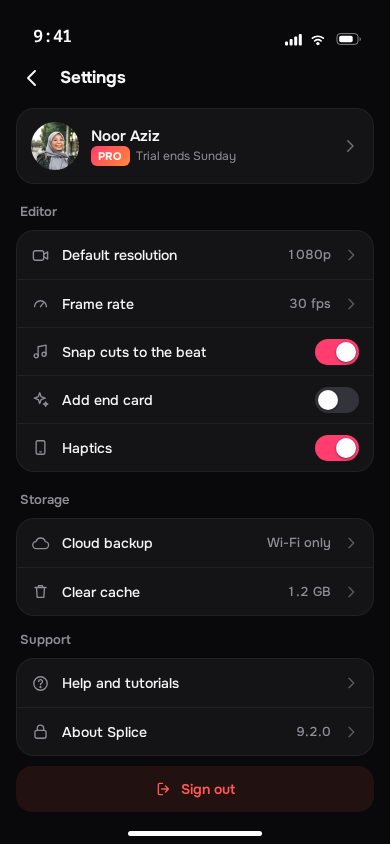
A settings screen from Splice, a video editor for short clips app template in a Dark-first style. Screen 25 of 25.
Splice is a complete short video editor: welcome and sign in, a home with a new project card, quick tools and drafts, a camera with segment recording, a media picker, the multi-track editor, clip trim, speed curves, text styling, auto captions, a sound library, effects, filters and adjust, canvas and background, templates and a template preview, export settings, live export progress and a saved screen, drafts, cloud storage stats, notifications, a Pro plan, profile and settings. Near black with a hot pink to tangerine gradient and colour coded timeline lanes.
| Detail | Value |
|---|---|
| Screen type | Settings |
| App | Splice: Video editor for short clips |
| Category | Lifestyle |
| Design language | Dark-first, dark |
| Type | Unbounded for headings, Onest for text |
| Colours | #09090b background, #141417 surface, #f5f5f7 text, #8e8e98 text-muted, #ff3d6e accent, #ffffff accent-contrast, #ffc23d secondary, #26262c border, #ff5a52 danger |
What this screen says
- Settings
- Noor Aziz
- PRO Trial ends Sunday
- Editor
- Default resolution 1080p
- Frame rate 30 fps
- Snap cuts to the beat
- Add end card
- Haptics
- Storage
- Cloud backup Wi-Fi only
- Clear cache 1.2 GB
- Support
- Help and tutorials
- About Splice 9.2.0
- Sign out
Around it in Splice
More settings screens
- Filmlog Settings: Film diary and reviews
- Guardrail Content filters: Parental controls and screen time
- Collar Settings: GPS pet tracker
- Postage Settings: Send parcels and find drop-off points
- Specs Settings: Glasses with virtual try-on
- Circuit Settings: Electronics store with trade-in and repairs
- Provenance Settings: Authenticated luxury resale
- Gavel Settings: Live online auctions
- Tidy Settings: Book home cleaners
- Dorm Settings: Find student housing
- Hem Settings: Tailoring and alterations, collected
- Lendly Settings: Borrow things from neighbours
Every lifestyle app settings screen
What makes a good settings screen
- Group options into clear sections. Account, notifications, privacy, appearance and help, with headings, so people scan to the right group.
- Label settings by their effect. "Daily reminder at 8:00" is clearer than "Reminders". Add a short description under options that need one.
- Use the right control. Toggles for on and off, a row that opens a list for choices, and sliders only for ranges.
- Apply changes immediately. Most mobile settings take effect when changed, with no Save button to forget.
The full settings screen guide and every example
Remix Splice free: describe your own app and it is drawn in this design. Or get its files from $10: Figma, React Native, SwiftUI, Flutter and HTML.