Templates · Settings screens · Lifestyle app · Specs
Specs Settings screen
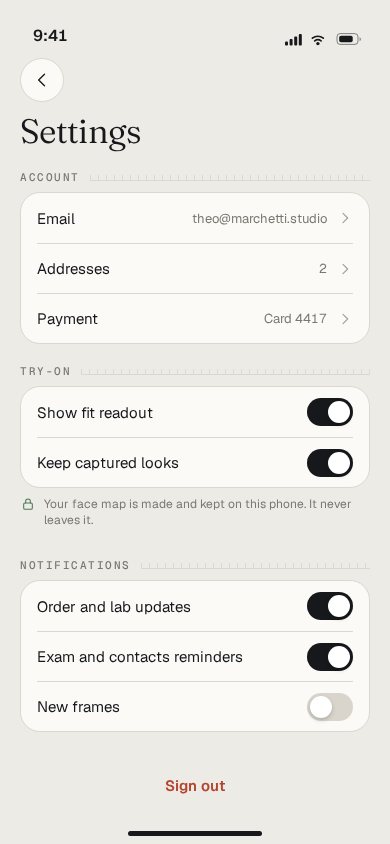
A settings screen from Specs, a glasses with virtual try-on app template in a Luxury style. Screen 25 of 25.
Specs is a complete eyewear app: welcome, a fit quiz, sign in, a shop home, browse and filters by width, shape and colour, a frame page with its measurements, a camera try-on with frames on your face, saved looks to compare, a five frame home try-on box, lenses, coatings and prescription, bag, checkout and order placed, lab tracking, eye exam booking and confirmation, contacts reorder, an eye health dashboard, a club plan, notifications, profile and settings. Stone and porcelain with ink and tortoise amber.
| Detail | Value |
|---|---|
| Screen type | Settings |
| App | Specs: Glasses with virtual try-on |
| Category | Lifestyle |
| Design language | Luxury, light |
| Type | Fraunces for headings, Geist for text |
| Colours | #ecebe6 background, #fbfaf7 surface, #17181c text, #7b7870 text-muted, #a3562a accent, #ffffff accent-contrast, #2c3a55 secondary, #dcd8cf border, #b5432f danger |
What this screen says
- Settings
- Account
- Email theo@marchetti.studio
- Addresses 2
- Payment Card 4417
- Try-on
- Show fit readout
- Keep captured looks
- Your face map is made and kept on this phone. It never leaves it.
- Notifications
- Order and lab updates
- Exam and contacts reminders
- New frames
- Sign out
Around it in Specs
More settings screens
- Sable Settings: Fashion store
- Bazaar Settings: Local buy and sell
- Kiln Settings: Handmade marketplace
- Drape Settings: AI wardrobe and daily outfits
- Mane Reminders: AI hairstyle try-on
- Annex Settings: AI interior redesign
- Kino Audio and subtitles: Film and series streaming
- Waybill Delivery preferences: Every parcel, read like its label
- Torque Settings: The workshop manual for your own car
- Vetly Settings: Pet health record
- Stitch Settings: A knitting companion drawn as one big knitting chart
- Roost Settings: Your shared house, stuck to the fridge door
Every lifestyle app settings screen
What makes a good settings screen
- Group options into clear sections. Account, notifications, privacy, appearance and help, with headings, so people scan to the right group.
- Label settings by their effect. "Daily reminder at 8:00" is clearer than "Reminders". Add a short description under options that need one.
- Use the right control. Toggles for on and off, a row that opens a list for choices, and sliders only for ranges.
- Apply changes immediately. Most mobile settings take effect when changed, with no Save button to forget.
The full settings screen guide and every example
Remix Specs free: describe your own app and it is drawn in this design. Or get its files from $10: Figma, React Native, SwiftUI, Flutter and HTML.