Templates · Settings screens · Lifestyle app · Lendly
Lendly Settings screen
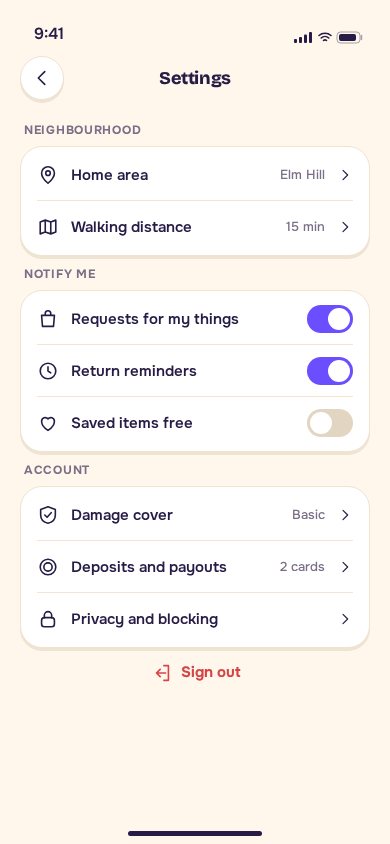
A settings screen from Lendly, a borrow things from neighbours app template in a Playful style. Screen 25 of 25.
Lendly is a complete library of things for your street: welcome, sign in, address check, an explore home with categories and fresh listings, search, a map with credit pins, a party gear category, an item page with condition photos, deposit and owner, the owner's profile, a date picker, a request with deposit and damage cover, request sent, borrowing, a pickup screen with a handover code, a return checklist, ratings, listing your own item, approving requests, inbox and chat, community credits, Lendly Plus, notifications, profile and settings. Oat, grape and sunflower with mint and coral.
| Detail | Value |
|---|---|
| Screen type | Settings |
| App | Lendly: Borrow things from neighbours |
| Category | Lifestyle |
| Design language | Playful, light |
| Type | Bricolage Grotesque for headings, Onest for text |
| Colours | #fff7ec background, #ffffff surface, #261c45 text, #7a6f86 text-muted, #6b4eff accent, #ffffff accent-contrast, #ffc83d secondary, #efe3d2 border, #d64545 danger |
What this screen says
- Settings
- Neighbourhood
- Home area Elm Hill
- Walking distance 15 min
- Notify me
- Requests for my things
- Return reminders
- Saved items free
- Account
- Damage cover Basic
- Deposits and payouts 2 cards
- Privacy and blocking
- Sign out
Around it in Lendly
More settings screens
- Posy Settings: Flower delivery and weekly stems
- Fern Settings: Plant care
- Doorstep Settings: Homes for sale and rent
- Rewear Settings: Secondhand fashion marketplace
- Laced Settings: Sneaker drops and raffles
- Gloss Settings: Salon and spa booking
- Vow Settings: Wedding planner
- Drizzle Settings: Weather with living skies
- Byline Settings: Daily news reader
- Shelf Settings: Reading tracker and book club
- Marquee Settings: Cinema tickets and watchlist
- Handy Settings: Home services
Every lifestyle app settings screen
What makes a good settings screen
- Group options into clear sections. Account, notifications, privacy, appearance and help, with headings, so people scan to the right group.
- Label settings by their effect. "Daily reminder at 8:00" is clearer than "Reminders". Add a short description under options that need one.
- Use the right control. Toggles for on and off, a row that opens a list for choices, and sliders only for ranges.
- Apply changes immediately. Most mobile settings take effect when changed, with no Save button to forget.
The full settings screen guide and every example
Remix Lendly free: describe your own app and it is drawn in this design. Or get its files from $10: Figma, React Native, SwiftUI, Flutter and HTML.