Templates · Settings screens · Lifestyle app · Guardrail
Guardrail Content filters screen
A settings screen from Guardrail, a parental controls and screen time app template in a Minimal style. Screen 18 of 25.
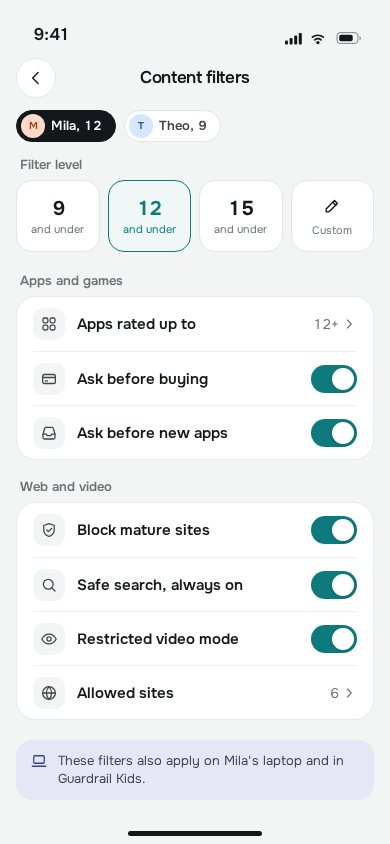
Guardrail is a complete family screen time app for parents: welcome, adding a child, sign in and linking a device, a family home with each child's day rail, a child overview, weekly activity, per app usage, daily and app limits, a bedtime dial, school time, app approval requests with an approved screen, bonus time, content filters by age, live location, devices with lock and ring, notifications, a Plus plan, profile and settings. Pale mist and white with petrol teal, dusk indigo and a warm amber for bonus time.
| Detail | Value |
|---|---|
| Screen type | Settings |
| App | Guardrail: Parental controls and screen time |
| Category | Lifestyle |
| Design language | Minimal, light |
| Type | Onest |
| Colours | #f3f5f4 background, #ffffff surface, #12181b text, #687476 text-muted, #0e7a7e accent, #ffffff accent-contrast, #3d3f8f secondary, #e6eae9 border, #e5603f danger |
What this screen says
- Content filters
- M Mila, 12 T Theo, 9
- Filter level
- 9and under
- 12and under
- 15and under
- Custom
- Apps and games
- Apps rated up to
- Ask before buying
- Ask before new apps
- Web and video
- Block mature sites
- Safe search, always on
- Restricted video mode
- Allowed sites
- These filters also apply on Mila's laptop and in Guardrail Kids.
Around it in Guardrail
More settings screens
- Roost Settings: Your shared house, stuck to the fridge door
- Trellis Settings: Vegetable garden planner
- Grain Settings: Camera and photo editor
- Posy Settings: Flower delivery and weekly stems
- Fern Settings: Plant care
- Doorstep Settings: Homes for sale and rent
- Rewear Settings: Secondhand fashion marketplace
- Laced Settings: Sneaker drops and raffles
- Gloss Settings: Salon and spa booking
- Vow Settings: Wedding planner
- Drizzle Settings: Weather with living skies
- Byline Settings: Daily news reader
Every lifestyle app settings screen
What makes a good settings screen
- Group options into clear sections. Account, notifications, privacy, appearance and help, with headings, so people scan to the right group.
- Label settings by their effect. "Daily reminder at 8:00" is clearer than "Reminders". Add a short description under options that need one.
- Use the right control. Toggles for on and off, a row that opens a list for choices, and sliders only for ranges.
- Apply changes immediately. Most mobile settings take effect when changed, with no Save button to forget.
The full settings screen guide and every example
Remix Guardrail free: describe your own app and it is drawn in this design. Or get its files from $10: Figma, React Native, SwiftUI, Flutter and HTML.