Templates · Settings screens · Lifestyle app · Tidy
Tidy Settings screen
A settings screen from Tidy, a book home cleaners app template in a Playful style. Screen 25 of 25.
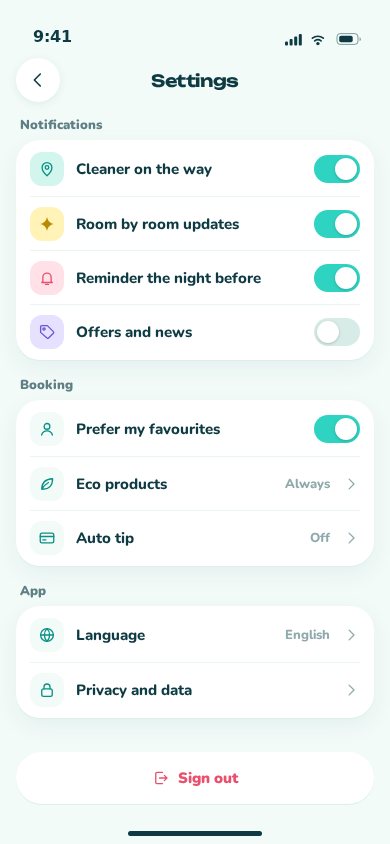
Tidy is a complete home cleaning app: welcome, sign in, a home with your next clean and plan, services from standard to move out, a deep clean page, home size and add ons, a date and slot picker with repeat options, an auto matched or hand picked cleaner with ratings and reviews, checkout and a confirmed booking. Then live arrival on a map, a room by room checklist during the job, chat, rate and tip, a recurring plan, home stats, a membership, notifications, home notes, account and settings. Rinse water mint and white with bubbly aqua, lemon and a soft pink.
| Detail | Value |
|---|---|
| Screen type | Settings |
| App | Tidy: Book home cleaners |
| Category | Lifestyle |
| Design language | Playful, light |
| Type | Unbounded for headings, Nunito for text |
| Colours | #f2fbf8 background, #ffffff surface, #0e3b43 text, #5f7f84 text-muted, #ffdf3d accent, #0e3b43 accent-contrast, #2fd3c1 secondary, #d7ece7 border, #ff6b85 danger |
What this screen says
- Settings
- Notifications
- Cleaner on the way
- Room by room updates
- Reminder the night before
- Offers and news
- Booking
- Prefer my favourites
- Eco products Always
- Auto tip Off
- App
- Language English
- Privacy and data
- Sign out
Around it in Tidy
More settings screens
- Collar Settings: GPS pet tracker
- Postage Settings: Send parcels and find drop-off points
- Specs Settings: Glasses with virtual try-on
- Circuit Settings: Electronics store with trade-in and repairs
- Provenance Settings: Authenticated luxury resale
- Gavel Settings: Live online auctions
- Dorm Settings: Find student housing
- Hem Settings: Tailoring and alterations, collected
- Lendly Settings: Borrow things from neighbours
- Stub Settings: Fan to fan ticket resale
- Trove Settings: Visual ideas and boards
- Vidi Settings: Video platform for creators
Every lifestyle app settings screen
What makes a good settings screen
- Group options into clear sections. Account, notifications, privacy, appearance and help, with headings, so people scan to the right group.
- Label settings by their effect. "Daily reminder at 8:00" is clearer than "Reminders". Add a short description under options that need one.
- Use the right control. Toggles for on and off, a row that opens a list for choices, and sliders only for ranges.
- Apply changes immediately. Most mobile settings take effect when changed, with no Save button to forget.
The full settings screen guide and every example
Remix Tidy free: describe your own app and it is drawn in this design. Or get its files from $10: Figma, React Native, SwiftUI, Flutter and HTML.