Templates · Settings screens · Lifestyle app · Hem
Hem Settings screen
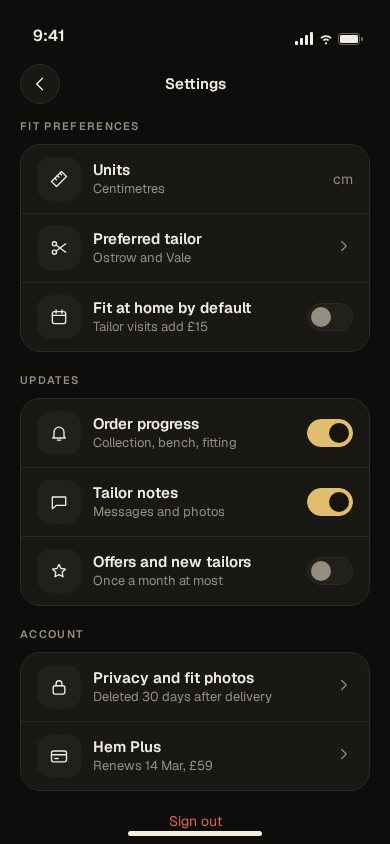
A settings screen from Hem, a lifestyle app template in a Minimal style. Screen 25 of 25.
Hem is a complete tailoring and alterations app: welcome and how it works, sign in, a home with the order at the bench and nearby tailors, choosing a garment and the work, a drawn hem length diagram, guided self measuring on a body diagram, a fit photo camera, a price quote, a tailor page, a collection slot picker, review and booking, live courier tracking on a map, tailor progress with notes and photos, a fitting appointment, delivery back with a handover code, orders, saved measurements with a waist trend, garment history, a Plus plan, notifications, profile and settings. Warm black and charcoal with chalk gold and bone white.
| Detail | Value |
|---|---|
| Screen type | Settings |
| App | Hem: Tailoring and alterations, collected |
| Category | Lifestyle |
| Design language | Minimal, dark |
| Type | Instrument Serif for headings, Geist for text |
| Colours | #0e0d0b background, #191814 surface, #f2ede4 text, #948d81 text-muted, #e2bd6b accent, #17140e accent-contrast, #22201b secondary, #2c2a24 border, #d9665a danger |
What this screen says
- Settings
- Fit preferences
- Units
- Centimetres
- cm
- Preferred tailor
- Ostrow and Vale
- Fit at home by default
- Tailor visits add £15
- Updates
- Order progress
- Collection, bench, fitting
- Tailor notes
- Messages and photos
- Offers and new tailors
- Once a month at most
- Account
- Privacy and fit photos
- Deleted 30 days after delivery
- Hem Plus
- Renews 14 Mar, £59
- Sign out
Around it in Hem
More settings screens
- Torque Settings: The workshop manual for your own car
- Vetly Settings: Pet health record
- Stitch Settings: A knitting companion drawn as one big knitting chart
- Roost Settings: Your shared house, stuck to the fridge door
- Trellis Settings: Vegetable garden planner
- Grain Settings: Camera and photo editor
- Posy Settings: Flower delivery and weekly stems
- Fern Settings: Plant care
- Doorstep Settings: Homes for sale and rent
- Rewear Settings: Secondhand fashion marketplace
- Laced Settings: Sneaker drops and raffles
- Gloss Settings: Salon and spa booking
Every lifestyle app settings screen
What makes a good settings screen
- Group options into clear sections. Account, notifications, privacy, appearance and help, with headings, so people scan to the right group.
- Label settings by their effect. "Daily reminder at 8:00" is clearer than "Reminders". Add a short description under options that need one.
- Use the right control. Toggles for on and off, a row that opens a list for choices, and sliders only for ranges.
- Apply changes immediately. Most mobile settings take effect when changed, with no Save button to forget.
The full settings screen guide and every example
Remix Hem free: describe your own app and it is drawn in this design. Or get its files from $10: Figma, React Native, SwiftUI, Flutter and HTML.