Templates · Booking and checkout screens · Productivity app · Replay
Replay Upgrade screen
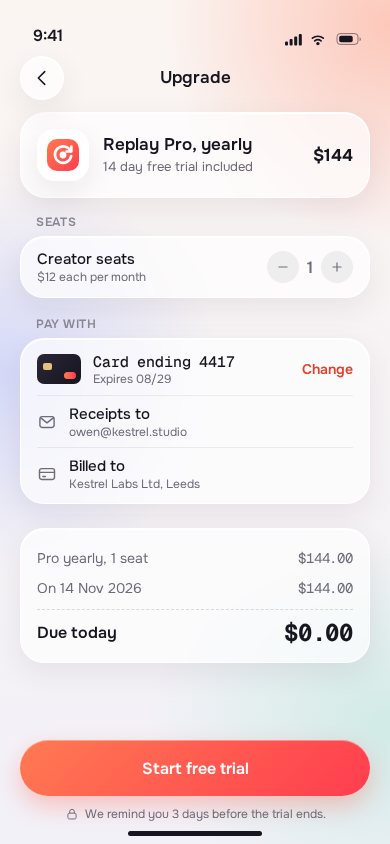
A checkout screen from Replay, a record and share screen videos app template in a Glass style. Screen 23 of 25.
Replay is a complete async video app for teams: welcome, studio permissions and sign in, a home with record modes and recent videos, library, folders and transcript search, a recording setup, a live screen recording with a camera bubble and drawing, trim and smart cleanup, a ready screen with the link copied, the video page with timestamped reactions, transcript, AI summary and chapters, comments, share permissions, viewer insights and viewers, a workspace with spaces and invites, inbox, Pro plan, upgrade, profile and settings. Warm porcelain glass with coral, cobalt and mint.
| Detail | Value |
|---|---|
| Screen type | Checkout |
| App | Replay: Record and share screen videos |
| Category | Productivity |
| Design language | Glass, light |
| Type | Bricolage Grotesque for headings, Onest for text |
| Colours | #fbf5f2 background, #ffffff surface, #17151f text, #6e6a78 text-muted, #ff4f3b accent, #ffffff accent-contrast, #3b5bff secondary, #ebe7ee border, #14a97c success, #e5402c danger |
What this screen says
- Upgrade
- Replay Pro, yearly
- 14 day free trial included
- Seats
- Creator seats
- $12 each per month
- Pay with
- Card ending 4417
- Expires 08/29
- Change
- Receipts to
- owen@kestrel.studio
- Billed to
- Kestrel Labs Ltd, Leeds
- Pro yearly, 1 seat $144.00
- On 14 Nov 2026 $144.00
- Due today $0.00
- Start free trial
- We remind you 3 days before the trial ends.
Around it in Replay
More booking and checkout screens
- Staffroom Review request: HR, payslips and time off
- Slot Pick a day: Booking links and meeting scheduling
- Tunnel Checkout: VPN and online privacy
- Ping Checkout: Internet speed test
- Glance Checkout: Visual search with the camera
- Beam Checkout: Send big files
- Lectern Export: Slides and presenter remote
- Ringer Block number: Phone, contacts and voicemail
- Pipeline Quote: Sales CRM on the road
- Aim Close quarter: Goals and key results
- Scribe Checkout: Voice memos to notes
- Inkline Finish signing: Sign and send contracts
Every productivity app checkout screen
What makes a good checkout screen
- Show the total early and honestly. Taxes, delivery and service fees should appear before the last step. A higher total on the final screen feels like a trick.
- Offer wallet payments. Apple Pay and Google Pay skip card typing entirely. Show them first when they are available.
- Ask for the minimum. Only the fields needed to deliver or book. Save details for next time.
- Let people review before paying. A clear summary of items, dates, address and price, with each part editable without starting over.
The full checkout screen guide and every example
Remix Replay free: describe your own app and it is drawn in this design. Or get its files from $10: Figma, React Native, SwiftUI, Flutter and HTML.