Templates · Booking and checkout screens · Productivity app · Ringer
Ringer Block number screen
A checkout screen from Ringer, a productivity app template in a Minimal style. Screen 20 of 25.
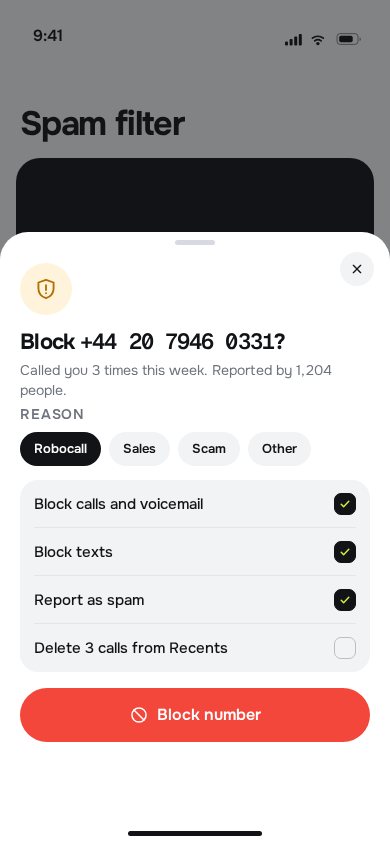
Ringer is a complete phone app: welcome, permissions, sign in with a texted code, favourites, recents with missed calls and filtered spam, call details, contacts with an alphabet index, a contact card, a new contact form, search across people and voicemail, a keypad, an incoming call, the in-call screen, a call recording consent sheet and a call summary, visual voicemail with a live transcript, a spam filter, blocking a number with a confirmation, call stats, a Plus plan, my card and settings. Porcelain and white with ink, signal lime and a coral for missed and declined calls.
| Detail | Value |
|---|---|
| Screen type | Checkout |
| App | Ringer: Phone, contacts and voicemail |
| Category | Productivity |
| Design language | Minimal, light |
| Type | Onest |
| Colours | #f2f3f5 background, #ffffff surface, #111316 text, #6e737c text-muted, #c8f03c accent, #111316 accent-contrast, #1b1d21 secondary, #e3e5e9 border, #f2473a danger, #b26f00 warning |
What this screen says
- Spam filter
- Block +44 20 7946 0331 ?
- Called you 3 times this week. Reported by 1,204 people.
- Reason
- Robocall Sales Scam Other
- Block calls and voicemail
- Block texts
- Report as spam
- Delete 3 calls from Recents
- Block number
Around it in Ringer
More booking and checkout screens
- Inkline Finish signing: Sign and send contracts
- Dispatch Invoice: Field service jobs for technicians
- Stash Checkout: Read-it-later and highlights
- Uptime Upgrade: Server and site monitoring
- Branch Export: Mind maps
- Bench Fund escrow: Freelance marketplace
- Streak Check in: Small days, long chains
- Daybook Find a time: Calendar and planner
- Inkwell Print a volume: Daily journal
- Shortlist Review application: Job search and application tracker
- Juno Checkout: AI chat assistant
- Opal Invoice: Studio dashboard
Every productivity app checkout screen
What makes a good checkout screen
- Show the total early and honestly. Taxes, delivery and service fees should appear before the last step. A higher total on the final screen feels like a trick.
- Offer wallet payments. Apple Pay and Google Pay skip card typing entirely. Show them first when they are available.
- Ask for the minimum. Only the fields needed to deliver or book. Save details for next time.
- Let people review before paying. A clear summary of items, dates, address and price, with each part editable without starting over.
The full checkout screen guide and every example
Remix Ringer free: describe your own app and it is drawn in this design. Or get its files from $10: Figma, React Native, SwiftUI, Flutter and HTML.