Templates · Profile screens · Productivity app · Replay
Replay Profile screen
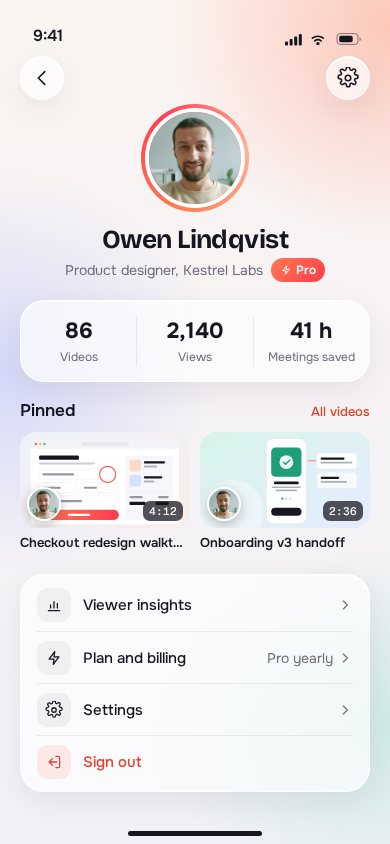
A profile screen from Replay, a record and share screen videos app template in a Glass style. Screen 24 of 25.
Replay is a complete async video app for teams: welcome, studio permissions and sign in, a home with record modes and recent videos, library, folders and transcript search, a recording setup, a live screen recording with a camera bubble and drawing, trim and smart cleanup, a ready screen with the link copied, the video page with timestamped reactions, transcript, AI summary and chapters, comments, share permissions, viewer insights and viewers, a workspace with spaces and invites, inbox, Pro plan, upgrade, profile and settings. Warm porcelain glass with coral, cobalt and mint.
| Detail | Value |
|---|---|
| Screen type | Profile |
| App | Replay: Record and share screen videos |
| Category | Productivity |
| Design language | Glass, light |
| Type | Bricolage Grotesque for headings, Onest for text |
| Colours | #fbf5f2 background, #ffffff surface, #17151f text, #6e6a78 text-muted, #ff4f3b accent, #ffffff accent-contrast, #3b5bff secondary, #ebe7ee border, #14a97c success, #e5402c danger |
What this screen says
- Owen Lindqvist
- Product designer, Kestrel Labs Pro
- Videos
- Views
- 41 h
- Meetings saved
- Pinned
- All videos
- Checkout redesign walkthrough
- Onboarding v3 handoff
- Viewer insights
- Plan and billing
- Pro yearly
- Settings
- Sign out
Around it in Replay
More profile screens
- Slot Account: Booking links and meeting scheduling
- Sheet Account: Spreadsheets and databases
- Tunnel Account: VPN and online privacy
- Ping Profile: Internet speed test
- Glance Profile: Visual search with the camera
- Easel Profile: Collaborative whiteboard
- Token Profile: Two-factor codes and sign-in approvals
- Beam Profile: Send big files
- Parchment Profile: Documents, edit and share
- Lectern Profile: Slides and presenter remote
- Ringer My card: Phone, contacts and voicemail
- Pipeline Profile: Sales CRM on the road
Every productivity app profile screen
What makes a good profile screen
- Lead with identity. Photo, name and one line about the person at the top. It confirms whose profile this is.
- Show meaningful stats. Two to four numbers that matter in this app, like workouts, followers, books read or streak.
- Make editing obvious for the owner. An Edit profile button near the top, shown only on your own profile.
- Organise content with tabs. Posts, activity, saved or achievements as tabs keep a long profile tidy.
The full profile screen guide and every example
Remix Replay free: describe your own app and it is drawn in this design. Or get its files from $10: Figma, React Native, SwiftUI, Flutter and HTML.