Templates · Booking and checkout screens · Productivity app · Staffroom
Staffroom Review request screen
A checkout screen from Staffroom, a productivity app template in an Enterprise style. Screen 9 of 25.
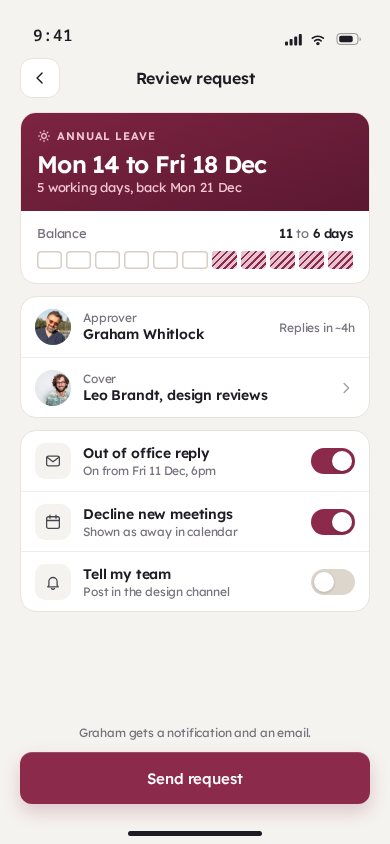
Staffroom is a complete employee HR app: welcome, workspace sign in and a 6 digit code, a home with next payday, requests waiting and the leave balance, a manager inbox with a time off approval, time off balances, a calendar request with review and confirmation, a team absence calendar, pay with a year chart, a full UK payslip, expenses with a receipt scanner and a new claim form, benefits and a health cover plan picker, a people directory, a colleague profile, an org chart, a quarterly check in, notifications, a staff badge profile and settings. Warm stone and white with deep claret and ochre.
| Detail | Value |
|---|---|
| Screen type | Checkout |
| App | Staffroom: HR, payslips and time off |
| Category | Productivity |
| Design language | Enterprise, light |
| Type | Lexend |
| Colours | #f5f3ef background, #ffffff surface, #1f1b24 text, #77717d text-muted, #8b2a4a accent, #ffffff accent-contrast, #c9851b secondary, #e8e3dc border, #c4422f danger |
What this screen says
- Review request
- Annual leave
- Mon 14 to Fri 18 Dec
- 5 working days, back Mon 21 Dec
- Balance 11 to 6 days
- ApproverGraham Whitlock
- Replies in ~4h
- CoverLeo Brandt, design reviews
- Out of office replyOn from Fri 11 Dec, 6pm
- Decline new meetingsShown as away in calendar
- Tell my teamPost in the design channel
- Graham gets a notification and an email.
- Send request
Around it in Staffroom
More booking and checkout screens
- Dispatch Invoice: Field service jobs for technicians
- Stash Checkout: Read-it-later and highlights
- Uptime Upgrade: Server and site monitoring
- Branch Export: Mind maps
- Bench Fund escrow: Freelance marketplace
- Streak Check in: Small days, long chains
- Daybook Find a time: Calendar and planner
- Inkwell Print a volume: Daily journal
- Shortlist Review application: Job search and application tracker
- Juno Checkout: AI chat assistant
- Opal Invoice: Studio dashboard
- Chrono Send invite: World clock, timers and stopwatch
Every productivity app checkout screen
What makes a good checkout screen
- Show the total early and honestly. Taxes, delivery and service fees should appear before the last step. A higher total on the final screen feels like a trick.
- Offer wallet payments. Apple Pay and Google Pay skip card typing entirely. Show them first when they are available.
- Ask for the minimum. Only the fields needed to deliver or book. Save details for next time.
- Let people review before paying. A clear summary of items, dates, address and price, with each part editable without starting over.
The full checkout screen guide and every example
Remix Staffroom free: describe your own app and it is drawn in this design. Or get its files from $10: Figma, React Native, SwiftUI, Flutter and HTML.