Templates · Booking and checkout screens · Productivity app · Lectern
Lectern Export screen
A checkout screen from Lectern, a slides and presenter remote app template in a Dark-first style. Screen 20 of 25.
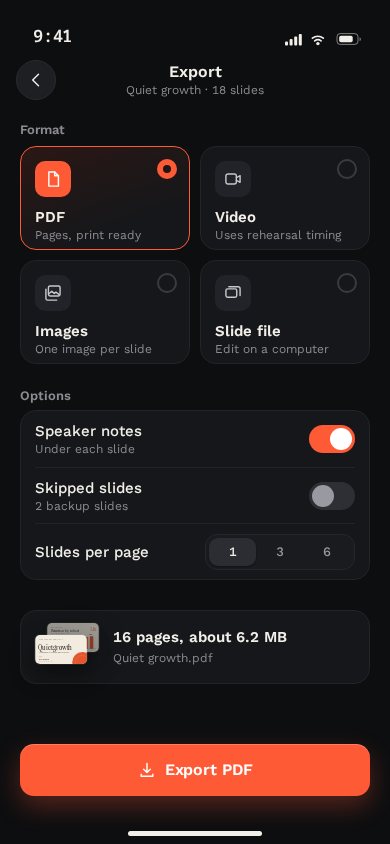
Lectern is a complete slides app: welcome, sign in, a deck gallery with the next talk, search across slides and notes, themes for a new deck, a deck page, the slide navigator, a slide editor with text format, layouts, chart data and builds, comments, rehearsal with a live timer and a report, connecting to a screen, presenter view with notes, the phone as a remote and laser, share, export and a ready file, a Pro plan, activity, profile and settings. Graphite backstage, cream paper slides and a laser vermilion.
| Detail | Value |
|---|---|
| Screen type | Checkout |
| App | Lectern: Slides and presenter remote |
| Category | Productivity |
| Design language | Dark-first, dark |
| Type | Instrument Serif for headings, Work Sans for text |
| Colours | #0d0e10 background, #16171a surface, #f2efe9 text, #8e8c93 text-muted, #ff5a36 accent, #ffffff accent-contrast, #f2ece0 secondary, #2a2b30 border, #ffc14d warning, #5ad1b0 success |
What this screen says
- ExportQuiet growth · 18 slides
- Format
- Pages, print ready
- Video
- Uses rehearsal timing
- Images
- One image per slide
- Slide file
- Edit on a computer
- Options
- Speaker notes
- Under each slide
- Skipped slides
- 2 backup slides
- Slides per page
- 16 pages, about 6.2 MB
- Quiet growth.pdf
- Export PDF
Around it in Lectern
More booking and checkout screens
- Glossa Checkout: Translate text, voice and camera
- Layout Download: Design anything from templates
- Tick Checkout: To-do lists and reminders
- Beacon Confirm lost mode: Find your devices and people
- Staffroom Review request: HR, payslips and time off
- Slot Pick a day: Booking links and meeting scheduling
- Tunnel Checkout: VPN and online privacy
- Ping Checkout: Internet speed test
- Glance Checkout: Visual search with the camera
- Replay Upgrade: Record and share screen videos
- Beam Checkout: Send big files
- Ringer Block number: Phone, contacts and voicemail
Every productivity app checkout screen
What makes a good checkout screen
- Show the total early and honestly. Taxes, delivery and service fees should appear before the last step. A higher total on the final screen feels like a trick.
- Offer wallet payments. Apple Pay and Google Pay skip card typing entirely. Show them first when they are available.
- Ask for the minimum. Only the fields needed to deliver or book. Save details for next time.
- Let people review before paying. A clear summary of items, dates, address and price, with each part editable without starting over.
The full checkout screen guide and every example
Remix Lectern free: describe your own app and it is drawn in this design. Or get its files from $10: Figma, React Native, SwiftUI, Flutter and HTML.