Templates · Booking and checkout screens · Productivity app · Ping
Ping Checkout screen
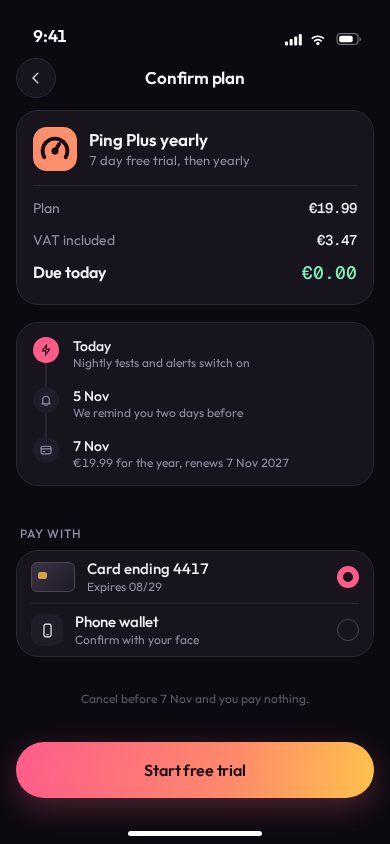
A checkout screen from Ping, an internet speed test app template in a Dark-first style. Screen 22 of 25.
Ping is a complete internet speed test app: welcome, location permission and sign in, a home with the GO gauge, live download and upload tests, a result with plan check, test details with latency ranges, results history and 30 day insights, server picker, a hex coverage map, provider rankings and a provider page, a video streaming test and its result, a Wi-Fi channel analyzer, a room by room signal finder, nearby outages, a report to your provider, a Plus plan with checkout, alerts, profile and settings. Plum black with signal rose, sodium amber and ice.
| Detail | Value |
|---|---|
| Screen type | Checkout |
| App | Ping: Internet speed test |
| Category | Productivity |
| Design language | Dark-first, dark |
| Type | Outfit |
| Colours | #0c0a10 background, #17141d surface, #f6f2f8 text, #958da3 text-muted, #ff5c8a accent, #1a0a12 accent-contrast, #ffc24b secondary, #2a2533 border, #ff6b5b danger |
What this screen says
- Confirm plan
- Ping Plus yearly
- 7 day free trial, then yearly
- Plan €19.99
- VAT included €3.47
- Due today €0.00
- Today
- Nightly tests and alerts switch on
- 5 Nov
- We remind you two days before
- 7 Nov
- €19.99 for the year, renews 7 Nov 2027
- Pay with
- Card ending 4417
- Expires 08/29
- Phone wallet
- Confirm with your face
- Cancel before 7 Nov and you pay nothing.
- Start free trial
Around it in Ping
More booking and checkout screens
- Tapline Send a tip: Link-in-bio pages and analytics
- Quill Checkout: Docs, wikis and databases in one workspace
- Tandem Review plan: Team chat, channels and huddles
- Shipyard Upgrade: Issue tracking for product teams
- Canvas Checkout: Design files and comments on mobile
- Merge: Code, pull requests and reviews
- Query Checkout: AI answers with sources
- Glossa Checkout: Translate text, voice and camera
- Layout Download: Design anything from templates
- Tick Checkout: To-do lists and reminders
- Beacon Confirm lost mode: Find your devices and people
- Staffroom Review request: HR, payslips and time off
Every productivity app checkout screen
What makes a good checkout screen
- Show the total early and honestly. Taxes, delivery and service fees should appear before the last step. A higher total on the final screen feels like a trick.
- Offer wallet payments. Apple Pay and Google Pay skip card typing entirely. Show them first when they are available.
- Ask for the minimum. Only the fields needed to deliver or book. Save details for next time.
- Let people review before paying. A clear summary of items, dates, address and price, with each part editable without starting over.
The full checkout screen guide and every example
Remix Ping free: describe your own app and it is drawn in this design. Or get its files from $10: Figma, React Native, SwiftUI, Flutter and HTML.