Templates · Booking and checkout screens · Productivity app · Pipeline
Pipeline Quote screen
A checkout screen from Pipeline, a sales CRM on the road app template in an Enterprise style. Screen 16 of 25.
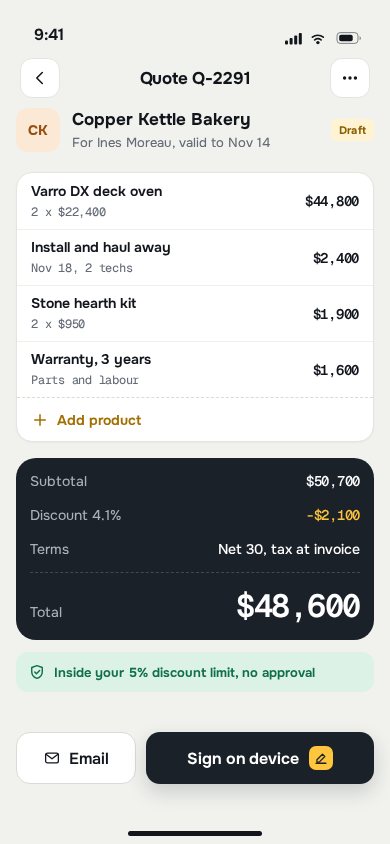
Pipeline is a complete field sales CRM: welcome and sign in, a Today screen with the next stop and quota, a live route map, check in on arrival, a stage board pipeline, deal, account and contact pages, search and a map of nearby accounts, visit logging with a voice note and a business card scanner, a new deal form, a quote with on device sign off and a deal won screen, a forecast dashboard, activity, tasks, notifications, a Pro plan, profile and settings. Stone grey and white with asphalt and marigold.
| Detail | Value |
|---|---|
| Screen type | Checkout |
| App | Pipeline: Sales CRM on the road |
| Category | Productivity |
| Design language | Enterprise, light |
| Type | Onest |
| Colours | #f1f2ee background, #ffffff surface, #12161c text, #646b75 text-muted, #ffc53d accent, #12161c accent-contrast, #1b2128 secondary, #e3e5df border, #d9453b danger |
What this screen says
- Quote Q-2291
- CK
- Copper Kettle Bakery
- For Ines Moreau, valid to Nov 14
- Draft
- Varro DX deck oven
- Install and haul away
- Nov 18, 2 techs
- Stone hearth kit
- Warranty, 3 years
- Parts and labour
- Add product
- Subtotal $50,700
- Discount 4.1% -$2,100
- Terms Net 30, tax at invoice
- Total $48,600
- Inside your 5% discount limit, no approval
- Sign on device
Around it in Pipeline
More booking and checkout screens
- Opal Invoice: Studio dashboard
- Chrono Send invite: World clock, timers and stopwatch
- Frontdesk Refund: Customer support inbox
- Campaign Schedule: Email marketing campaigns
- Outpost Schedule: Schedule social posts
- Polish Checkout: Writing assistant and keyboard
- Tapline Send a tip: Link-in-bio pages and analytics
- Quill Checkout: Docs, wikis and databases in one workspace
- Tandem Review plan: Team chat, channels and huddles
- Shipyard Upgrade: Issue tracking for product teams
- Canvas Checkout: Design files and comments on mobile
- Merge: Code, pull requests and reviews
Every productivity app checkout screen
What makes a good checkout screen
- Show the total early and honestly. Taxes, delivery and service fees should appear before the last step. A higher total on the final screen feels like a trick.
- Offer wallet payments. Apple Pay and Google Pay skip card typing entirely. Show them first when they are available.
- Ask for the minimum. Only the fields needed to deliver or book. Save details for next time.
- Let people review before paying. A clear summary of items, dates, address and price, with each part editable without starting over.
The full checkout screen guide and every example
Remix Pipeline free: describe your own app and it is drawn in this design. Or get its files from $10: Figma, React Native, SwiftUI, Flutter and HTML.