Templates · Settings screens · Smart home app · Porch
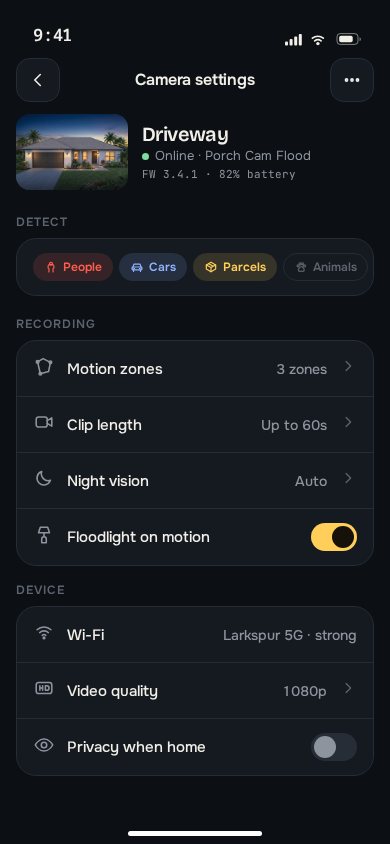
Porch Camera settings screen
A settings screen from Porch, a home security cameras app template in a Dark-first style. Screen 16 of 25.
Porch is a complete home security camera app: welcome, sign in, pairing a camera, a home with the arm mode and live feeds, all cameras, a full live view with talk and siren, a doorbell ring, a night alert, the event timeline, a clip player, smart search, familiar faces, deliveries, motion zones, camera settings, modes and an arming countdown, weekly insights, a Plus plan with checkout, notifications, household and settings. Blue black, porch lamp yellow and record red.
| Detail | Value |
|---|---|
| Screen type | Settings |
| App | Porch: Home security cameras |
| Category | Smart home |
| Design language | Dark-first, dark |
| Type | Bricolage Grotesque for headings, Onest for text |
| Colours | #0c1015 background, #151a21 surface, #f2efe8 text, #8d949e text-muted, #ffcf5a accent, #16120a accent-contrast, #7fdca0 secondary, #252c35 border, #ff5d4f danger |
What this screen says
- Camera settings
- Driveway
- Online · Porch Cam Flood FW 3.4.1 · 82% battery
- Detect
- People Cars Parcels Animals
- Recording
- Motion zones
- 3 zones
- Clip length
- Up to 60s
- Night vision
- Auto
- Floodlight on motion
- Device
- Wi-Fi
- Larkspur 5G · strong
- Video quality
- 1080p
- Privacy when home
Around it in Porch
More settings screens
- Upkeep Settings: Home maintenance calendar
- Kelvin Settings: Climate and thermostat
- Glow Settings: Light scenes and colour
- Tagged Settings: Home inventory for insurance
- Lobby Settings: Apartment building app
- Sweep Settings: Robot vacuum and mop
- Dusk Settings: Smart home scenarios
- Lumen Settings: Smart home energy
- Abode Settings: Smart home devices
- Boxed Settings: Book movers and plan moving day
- Meter Settings: Your energy supplier account
- Couch Settings: TV remote, casting and watchlist
Every smart home app settings screen
What makes a good settings screen
- Group options into clear sections. Account, notifications, privacy, appearance and help, with headings, so people scan to the right group.
- Label settings by their effect. "Daily reminder at 8:00" is clearer than "Reminders". Add a short description under options that need one.
- Use the right control. Toggles for on and off, a row that opens a list for choices, and sliders only for ranges.
- Apply changes immediately. Most mobile settings take effect when changed, with no Save button to forget.
The full settings screen guide and every example
Remix Porch free: describe your own app and it is drawn in this design. Or get its files from $10: Figma, React Native, SwiftUI, Flutter and HTML.