Templates · Home screens · Productivity app · Pomo
Pomo Home screen
A home screen from Pomo, a focus timer app template in a Minimal style. Screen 5 of 25.
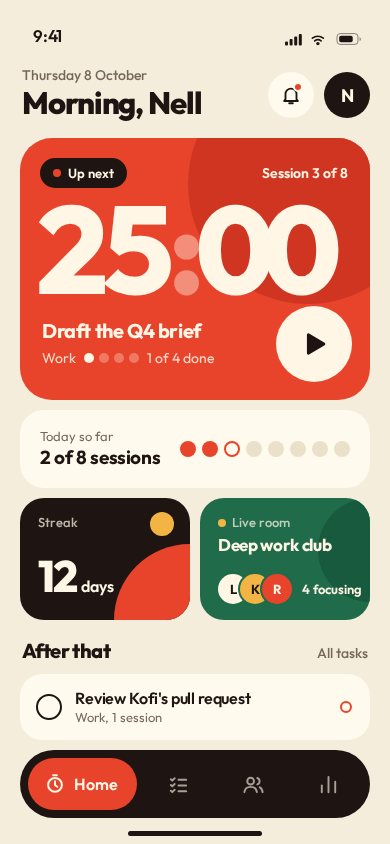
Pomo is a complete focus timer: welcome, sign in, picking a rhythm, a home with the next session, session setup, a full red timer with giant numerals, a green break, a session summary, tasks with session estimates, focus sounds and a mixer, focus rooms with friends and a live shared round, weekly stats, a streak calendar, history, a Plus plan, profile and settings. Flat tomato red, cream and ink, with no shadows and no gradients.
| Detail | Value |
|---|---|
| Screen type | Home |
| App | Pomo: Focus timer |
| Category | Productivity |
| Design language | Minimal, light |
| Type | Outfit |
| Colours | #f5eddc background, #fffaee surface, #1e1512 text, #75685b text-muted, #e8442b accent, #fff6e6 accent-contrast, #1f6b4a secondary, #e0d3ba border, #a8261a danger |
What this screen says
- Thursday 8 October
- Morning, Nell
- Up next
- Session 3 of 8
- Draft the Q4 brief
- Work 1 of 4 done
- Today so far
- 2 of 8 sessions
- Streak
- 12days
- Live room
- Deep work club
- LKR
- 4 focusing
- After thatAll tasks
- Review Kofi's pull request
- Work, 1 session
- Home
Around it in Pomo
More home screens
- Chrono World: World clock, timers and stopwatch
- Frontdesk Home: Customer support inbox
- Campaign Home: Email marketing campaigns
- Outpost Queue: Schedule social posts
- Pageview Home: Website analytics
- Polish Home: Writing assistant and keyboard
- Tapline My page: Link-in-bio pages and analytics
- Quill Home: Docs, wikis and databases in one workspace
- Tandem Home: Team chat, channels and huddles
- Shipyard Home: Issue tracking for product teams
- Canvas Recents: Design files and comments on mobile
- Merge Home: Code, pull requests and reviews
Every productivity app home screen
What makes a good home screen
- Put the most important thing first. Decide the one thing most people come for, like today's workout, a balance or the next booking, and give it the top of the screen.
- Make it feel current. Greetings with the time of day, today's date, fresh numbers and recent activity tell people the app is alive and about them.
- Keep quick actions within thumb reach. The two or three things people do most should be one tap away, in the lower part of the screen or a floating button.
- Group related content in clear sections. Use headings and spacing so the screen scans as a few blocks, not a long mixed list.
The full home screen guide and every example
Remix Pomo free: describe your own app and it is drawn in this design. Or get its files from $10: Figma, React Native, SwiftUI, Flutter and HTML.