Templates · Settings screens · Lifestyle app · Mane
Mane Reminders screen
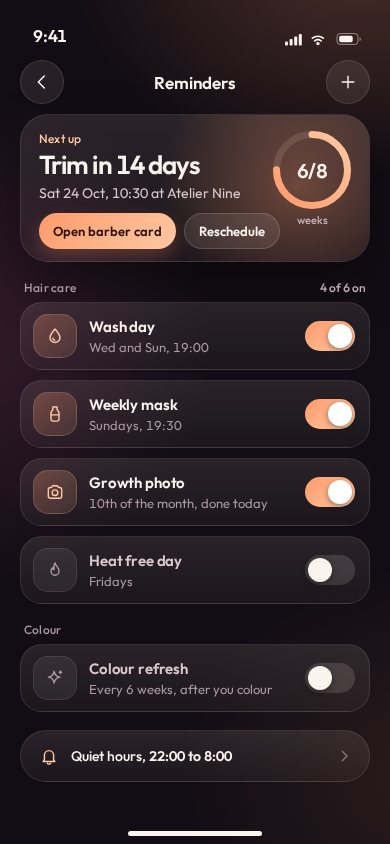
A settings screen from Mane, an AI hairstyle try-on app template in a Glass style. Screen 21 of 25.
Mane is a complete AI hairstyle app: a selfie guide, camera and face scan, a face shape result with proportion bars, a hair profile, a home with today's top match, style pages with match, upkeep and length, try on, a split compare, a colour lab with glossy shade strands, length and fringe, beard, saved looks, a barber card with guard numbers, trends, collections, a care routine, a growth tracker, reminders, salons, a paywall and settings. Dark plum with warm glass, copper, peach and cream.
| Detail | Value |
|---|---|
| Screen type | Settings |
| App | Mane: AI hairstyle try-on |
| Category | Lifestyle |
| Design language | Glass, dark |
| Type | Outfit |
| Colours | #120d14 background, #231a26 surface, #fbf3ee text, #ab9aa3 text-muted, #ff9a6b accent, #2a1208 accent-contrast, #ffc9a3 secondary, #3a2d3c border, #ff7a7a danger |
What this screen says
- Reminders
- Next up
- Trim in 14 days
- Sat 24 Oct, 10:30 at Atelier Nine
- Open barber card Reschedule
- weeks
- Hair care 4 of 6 on
- Wash day
- Wed and Sun, 19:00
- Weekly mask
- Sundays, 19:30
- Growth photo
- 10th of the month, done today
- Heat free day
- Fridays
- Colour
- Colour refresh
- Every 6 weeks, after you colour
- Quiet hours, 22:00 to 8:00
Around it in Mane
More settings screens
- Vow Settings: Wedding planner
- Drizzle Settings: Weather with living skies
- Byline Settings: Daily news reader
- Shelf Settings: Reading tracker and book club
- Marquee Settings: Cinema tickets and watchlist
- Handy Settings: Home services
- Tasker Settings: Book and do local odd jobs
- Toolbox Settings: Hardware store and project lists
- Brief Settings: News in sixty words
- Kibble Settings: Pet supplies and autoship
- Filmlog Settings: Film diary and reviews
- Guardrail Content filters: Parental controls and screen time
Every lifestyle app settings screen
What makes a good settings screen
- Group options into clear sections. Account, notifications, privacy, appearance and help, with headings, so people scan to the right group.
- Label settings by their effect. "Daily reminder at 8:00" is clearer than "Reminders". Add a short description under options that need one.
- Use the right control. Toggles for on and off, a row that opens a list for choices, and sliders only for ranges.
- Apply changes immediately. Most mobile settings take effect when changed, with no Save button to forget.
The full settings screen guide and every example
Remix Mane free: describe your own app and it is drawn in this design. Or get its files from $10: Figma, React Native, SwiftUI, Flutter and HTML.