Templates · Settings screens · Lifestyle app · Drizzle
Drizzle Settings screen
A settings screen from Drizzle, a weather with living skies app template in a Glass style. Screen 25 of 25.
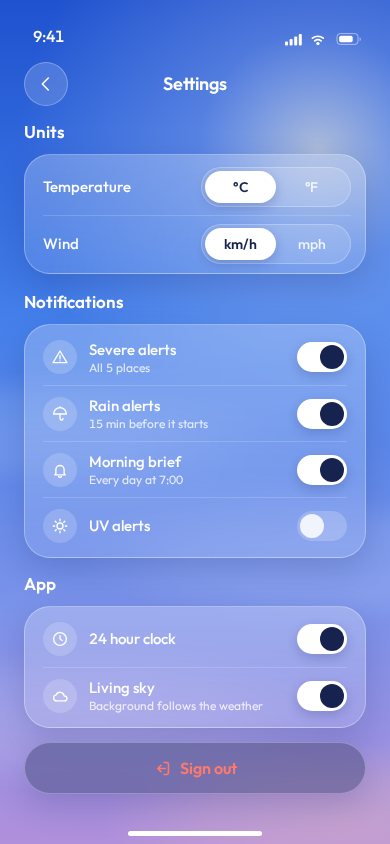
Drizzle is a complete weather app: welcome, location access, sign in and a code, a home with now, the next hours and four metric tiles, an hourly chart, a 10 day outlook, a day in detail, rain in the next hours, a live radar map with a timeline, air quality, sun and moon, saved places that each wear their own sky, adding a place, a city at night, severe alerts, home screen widgets, a Plus plan, notifications, profile and settings. The sky behind every screen changes with the conditions it reports.
| Detail | Value |
|---|---|
| Screen type | Settings |
| App | Drizzle: Weather with living skies |
| Category | Lifestyle |
| Design language | Glass, dark |
| Type | Outfit |
| Colours | #2f63d8 background, #5f8eee surface, #ffffff text, #d5e0fb text-muted, #ffd666 accent, #17234f accent-contrast, #8fd3ff secondary, #9db8f5 border, #ff7a6b danger |
What this screen says
- Settings
- Units
- Temperature
- °C
- °F
- Wind
- km/h
- mph
- Notifications
- Severe alerts
- All 5 places
- Rain alerts
- 15 min before it starts
- Morning brief
- Every day at 7:00
- UV alerts
- App
- 24 hour clock
- Living sky
- Background follows the weather
- Sign out
Around it in Drizzle
More settings screens
- Vow Settings: Wedding planner
- Byline Settings: Daily news reader
- Shelf Settings: Reading tracker and book club
- Marquee Settings: Cinema tickets and watchlist
- Handy Settings: Home services
- Tasker Settings: Book and do local odd jobs
- Toolbox Settings: Hardware store and project lists
- Brief Settings: News in sixty words
- Kibble Settings: Pet supplies and autoship
- Filmlog Settings: Film diary and reviews
- Guardrail Content filters: Parental controls and screen time
- Collar Settings: GPS pet tracker
Every lifestyle app settings screen
What makes a good settings screen
- Group options into clear sections. Account, notifications, privacy, appearance and help, with headings, so people scan to the right group.
- Label settings by their effect. "Daily reminder at 8:00" is clearer than "Reminders". Add a short description under options that need one.
- Use the right control. Toggles for on and off, a row that opens a list for choices, and sliders only for ranges.
- Apply changes immediately. Most mobile settings take effect when changed, with no Save button to forget.
The full settings screen guide and every example
Remix Drizzle free: describe your own app and it is drawn in this design. Or get its files from $10: Figma, React Native, SwiftUI, Flutter and HTML.