Templates · Settings screens · Lifestyle app · Byline
Byline Settings screen
A settings screen from Byline, a daily news reader app template in a Minimal style. Screen 25 of 25.
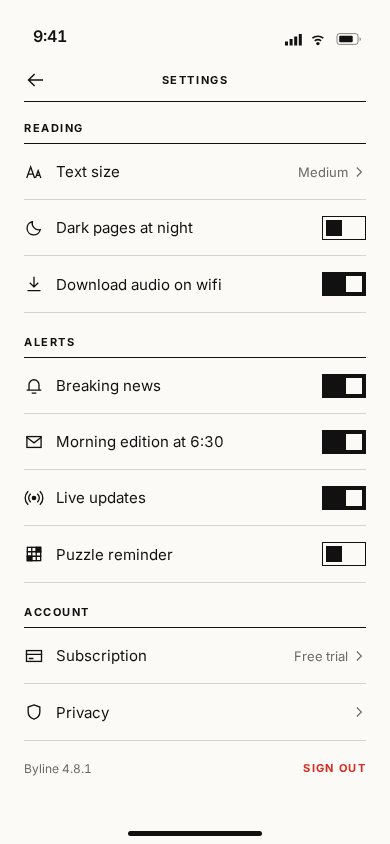
Byline is a complete news app for an invented city paper: welcome, sign in, a code and topic picks, a front page for today, an article with a drop cap and pull quote, live updates on a timeline, sections, a topic page, search, a writer page, audio briefings with a player, puzzles with a mini crossword, saved stories, alerts, reading stats, a subscription with payment, profile and settings. Everything is square cornered and ruled like a printed page, with red kept for what is live, new or selected.
| Detail | Value |
|---|---|
| Screen type | Settings |
| App | Byline: Daily news reader |
| Category | Lifestyle |
| Design language | Minimal, light |
| Type | Playfair Display |
| Colours | #fbfaf7 background, #f0eee8 surface, #111111 text, #6e6a63 text-muted, #d92b1f accent, #ffffff accent-contrast, #111111 secondary, #d8d4ca border, #d92b1f danger |
What this screen says
- Settings
- Reading
- Text size
- Medium
- Dark pages at night
- Download audio on wifi
- Alerts
- Breaking news
- Morning edition at 6:30
- Live updates
- Puzzle reminder
- Account
- Subscription
- Free trial
- Privacy
- Byline 4.8.1 Sign out
Around it in Byline
More settings screens
- Emporia Settings: Everything store
- Sable Settings: Fashion store
- Bazaar Settings: Local buy and sell
- Kiln Settings: Handmade marketplace
- Drape Settings: AI wardrobe and daily outfits
- Mane Reminders: AI hairstyle try-on
- Annex Settings: AI interior redesign
- Kino Audio and subtitles: Film and series streaming
- Waybill Delivery preferences: Every parcel, read like its label
- Torque Settings: The workshop manual for your own car
- Vetly Settings: Pet health record
- Stitch Settings: A knitting companion drawn as one big knitting chart
Every lifestyle app settings screen
What makes a good settings screen
- Group options into clear sections. Account, notifications, privacy, appearance and help, with headings, so people scan to the right group.
- Label settings by their effect. "Daily reminder at 8:00" is clearer than "Reminders". Add a short description under options that need one.
- Use the right control. Toggles for on and off, a row that opens a list for choices, and sliders only for ranges.
- Apply changes immediately. Most mobile settings take effect when changed, with no Save button to forget.
The full settings screen guide and every example
Remix Byline free: describe your own app and it is drawn in this design. Or get its files from $10: Figma, React Native, SwiftUI, Flutter and HTML.