Templates · Settings screens · Lifestyle app · Kibble
Kibble Settings screen
A settings screen from Kibble, a pet supplies and autoship app template in a Playful style. Screen 25 of 25.
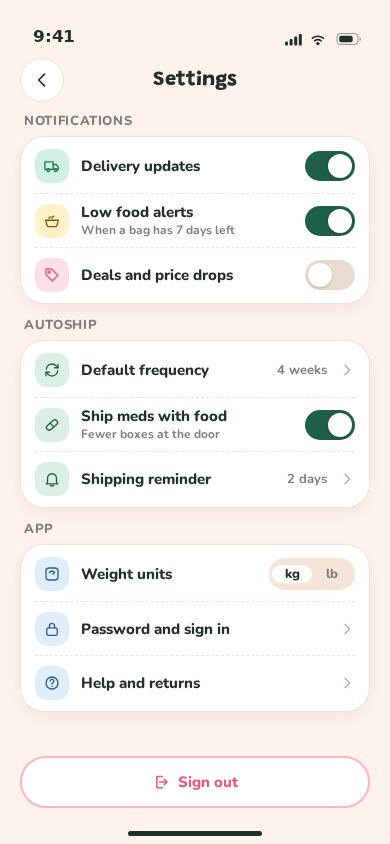
Kibble is a complete pet supplies app: welcome and pet setup, sign in, a home that knows when the food runs out, shop by pet, search with filters, a product page with sizes and autoship savings, reviews, cart, checkout and confirmation, live delivery tracking, orders, autoship schedules and edits, pet profiles with weight and diet, a pharmacy with refill requests, a vet chat, a spend dashboard, a membership plan, notifications, account and settings. Blush cream and white with deep pine green, bubblegum pink and butter yellow.
| Detail | Value |
|---|---|
| Screen type | Settings |
| App | Kibble: Pet supplies and autoship |
| Category | Lifestyle |
| Design language | Playful, light |
| Type | Grandstander for headings, Nunito for text |
| Colours | #fdf2ec background, #ffffff surface, #22302b text, #7d817a text-muted, #1f5f4a primary, #143f31 primary-ledge, #ff8fab accent, #e8557e accent-strong, #ffd166 highlight, #dcefe4 mint-tint, #ffe0e6 pink-tint, #fff1c9 butter-tint, #dfeefa sky-tint, #f1e1d8 border |
What this screen says
- Settings
- Notifications
- Delivery updates
- Low food alertsWhen a bag has 7 days left
- Deals and price drops
- Autoship
- Default frequency
- 4 weeks
- Ship meds with foodFewer boxes at the door
- Shipping reminder
- 2 days
- App
- Weight units
- kg lb
- Password and sign in
- Help and returns
- Sign out
Around it in Kibble
More settings screens
- Gloss Settings: Salon and spa booking
- Vow Settings: Wedding planner
- Drizzle Settings: Weather with living skies
- Byline Settings: Daily news reader
- Shelf Settings: Reading tracker and book club
- Marquee Settings: Cinema tickets and watchlist
- Handy Settings: Home services
- Tasker Settings: Book and do local odd jobs
- Toolbox Settings: Hardware store and project lists
- Brief Settings: News in sixty words
- Filmlog Settings: Film diary and reviews
- Guardrail Content filters: Parental controls and screen time
Every lifestyle app settings screen
What makes a good settings screen
- Group options into clear sections. Account, notifications, privacy, appearance and help, with headings, so people scan to the right group.
- Label settings by their effect. "Daily reminder at 8:00" is clearer than "Reminders". Add a short description under options that need one.
- Use the right control. Toggles for on and off, a row that opens a list for choices, and sliders only for ranges.
- Apply changes immediately. Most mobile settings take effect when changed, with no Save button to forget.
The full settings screen guide and every example
Remix Kibble free: describe your own app and it is drawn in this design. Or get its files from $10: Figma, React Native, SwiftUI, Flutter and HTML.