Templates · Settings screens · Lifestyle app · Toolbox
Toolbox Settings screen
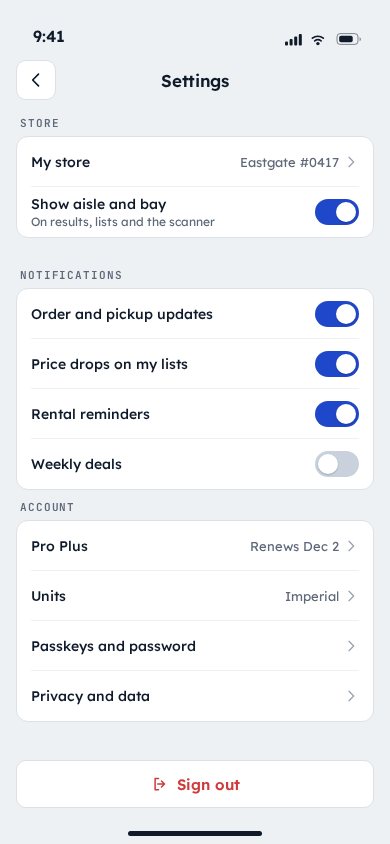
A settings screen from Toolbox, a hardware store and project lists app template in an Enterprise style. Screen 25 of 25.
Toolbox is a complete hardware store app: welcome, choosing a home store, sign in, a home with a ready pickup, the active project and departments, search with aisle, bay and stock on every result, a product page with specs and questions, a store floor plan with a walking route, a barcode scanner, project lists sorted by aisle with a decking calculator, a cart split into pickup and delivery, checkout, order placed, orders and a pickup locker, tool rental with a reservation, a Pro plan with job spend, notifications, profile and settings. Cool grey and white with ink, cobalt and a lime signal.
| Detail | Value |
|---|---|
| Screen type | Settings |
| App | Toolbox: Hardware store and project lists |
| Category | Lifestyle |
| Design language | Enterprise, light |
| Type | Lexend |
| Colours | #eef1f4 background, #ffffff surface, #0f1a2a text, #5d6878 text-muted, #1f47c9 accent, #ffffff accent-contrast, #d4f34a secondary, #dce1e8 border, #cf3a3a danger |
What this screen says
- Settings
- Store
- My store
- Eastgate #0417
- Show aisle and bayOn results, lists and the scanner
- Notifications
- Order and pickup updates
- Price drops on my lists
- Rental reminders
- Weekly deals
- Account
- Pro Plus
- Renews Dec 2
- Units
- Imperial
- Passkeys and password
- Privacy and data
- Sign out
Around it in Toolbox
More settings screens
- Annex Settings: AI interior redesign
- Kino Audio and subtitles: Film and series streaming
- Waybill Delivery preferences: Every parcel, read like its label
- Torque Settings: The workshop manual for your own car
- Vetly Settings: Pet health record
- Stitch Settings: A knitting companion drawn as one big knitting chart
- Roost Settings: Your shared house, stuck to the fridge door
- Trellis Settings: Vegetable garden planner
- Grain Settings: Camera and photo editor
- Posy Settings: Flower delivery and weekly stems
- Fern Settings: Plant care
- Doorstep Settings: Homes for sale and rent
Every lifestyle app settings screen
What makes a good settings screen
- Group options into clear sections. Account, notifications, privacy, appearance and help, with headings, so people scan to the right group.
- Label settings by their effect. "Daily reminder at 8:00" is clearer than "Reminders". Add a short description under options that need one.
- Use the right control. Toggles for on and off, a row that opens a list for choices, and sliders only for ranges.
- Apply changes immediately. Most mobile settings take effect when changed, with no Save button to forget.
The full settings screen guide and every example
Remix Toolbox free: describe your own app and it is drawn in this design. Or get its files from $10: Figma, React Native, SwiftUI, Flutter and HTML.