Templates · Settings screens · Education app · Lexis
Lexis Settings screen
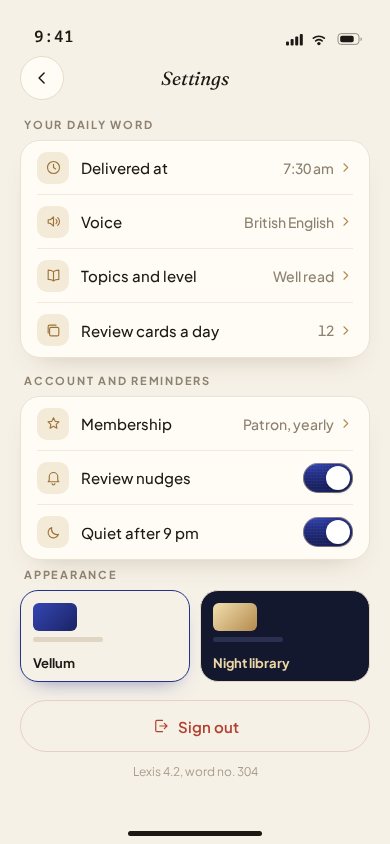
A settings screen from Lexis, an education app template in a Luxury style. Screen 25 of 25.
Lexis is a complete word a day app: welcome, interests and sign in, a Today screen with the word of the day as a lapis bookcloth card, the full dictionary entry, a pronunciation coach with your voice against the reference, an etymology lineage, quotations in the wild, a quiz with results, writing your own sentence, spaced review with flashcards, your lexicon with an A to Z thumb index, search, curated collections, adding a word you met, progress, a Patron plan, gifting a year, notifications, profile and settings. Vellum and ivory with lapis bookcloth and gilt.
| Detail | Value |
|---|---|
| Screen type | Settings |
| App | Lexis: A word a day |
| Category | Education |
| Design language | Luxury, light |
| Type | Fraunces for headings, Plus Jakarta Sans for text |
| Colours | #f6f1e7 background, #fffcf6 surface, #1c1813 text, #7b7265 text-muted, #25318a accent, #f6efe0 accent-contrast, #b48a4e secondary, #e6dccb border, #b3412f danger |
What this screen says
- Settings
- Your daily word
- Delivered at 7:30 am
- Voice British English
- Topics and level Well read
- Review cards a day 12
- Account and reminders
- Membership Patron, yearly
- Review nudges
- Quiet after 9 pm
- Appearance
- Vellum
- Night library
- Sign out
- Lexis 4.2, word no. 304
Around it in Lexis
More settings screens
- Gambit Settings: Chess training
- Buzzer Settings: Live trivia
- Homeroom Settings: School, all on one page
- Parla Settings: Language learning
- Recall Settings: Flashcards and spaced repetition
- Numo Settings: Kids maths game
- Syntax Settings: Learn to code
- Tuckin Parent controls: Bedtime stories for kids
- Zenith Settings: Night sky guide
- Chalk Settings: Design courses
- Encore Settings: Creator courses
- Classroom Settings: Class stream and assignments
Every education app settings screen
What makes a good settings screen
- Group options into clear sections. Account, notifications, privacy, appearance and help, with headings, so people scan to the right group.
- Label settings by their effect. "Daily reminder at 8:00" is clearer than "Reminders". Add a short description under options that need one.
- Use the right control. Toggles for on and off, a row that opens a list for choices, and sliders only for ranges.
- Apply changes immediately. Most mobile settings take effect when changed, with no Save button to forget.
The full settings screen guide and every example
Remix Lexis free: describe your own app and it is drawn in this design. Or get its files from $10: Figma, React Native, SwiftUI, Flutter and HTML.