Templates · Settings screens · Education app · Buzzer
Buzzer Settings screen
A settings screen from Buzzer, a live trivia app template in a Gen Z style. Screen 25 of 25.
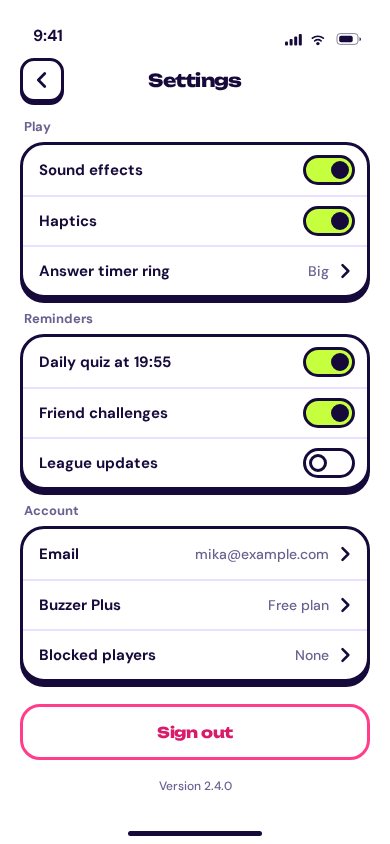
Buzzer is a complete live trivia app: welcome, sign in, picking topics and a name, a home counting down to the daily quiz, the lobby, a question with a countdown ring, the answer reveal, results and a podium, leagues with promotion zones, challenging a friend head to head, friends, categories, building and publishing your own quiz, stats, a Plus plan, notifications, profile and settings. Everything is drawn: shape marks, geometric avatars, shields and podiums.
| Detail | Value |
|---|---|
| Screen type | Settings |
| App | Buzzer: Live trivia |
| Category | Education |
| Design language | Gen Z, light |
| Type | DM Sans |
| Colours | #6d28ff background, #ffffff surface, #160a3a text, #6b6190 text-muted, #c6ff3d accent, #160a3a accent-contrast, #ff3d8b secondary, #160a3a border, #3dd6ff info |
What this screen says
- Settings
- Play
- Sound effects
- Haptics
- Answer timer ring Big
- Reminders
- Daily quiz at 19:55
- Friend challenges
- League updates
- Account
- Email mika@example.com
- Buzzer Plus Free plan
- Blocked players None
- Sign out
- Version 2.4.0
Around it in Buzzer
More settings screens
- Tiles Settings: Daily word and number puzzles
- Stacks Settings: Borrow e-books and audiobooks from your library
- Penpal Settings: Language exchange chat
- Lexis Settings: A word a day
- Quanta Settings: Interactive physics lessons
- Cram Settings: Exam prep and mock tests
- Quad Settings: University campus app
- Palm Settings: Learn sign language
- Epoch Settings: History on a timeline
- Wren Settings: Early reading for kids
- Proof Settings: Maths tutor that shows its working
- Skim Settings: Speed reading trainer
Every education app settings screen
What makes a good settings screen
- Group options into clear sections. Account, notifications, privacy, appearance and help, with headings, so people scan to the right group.
- Label settings by their effect. "Daily reminder at 8:00" is clearer than "Reminders". Add a short description under options that need one.
- Use the right control. Toggles for on and off, a row that opens a list for choices, and sliders only for ranges.
- Apply changes immediately. Most mobile settings take effect when changed, with no Save button to forget.
The full settings screen guide and every example
Remix Buzzer free: describe your own app and it is drawn in this design. Or get its files from $10: Figma, React Native, SwiftUI, Flutter and HTML.