Templates · Booking and checkout screens · Productivity app · Tick
Tick Checkout screen
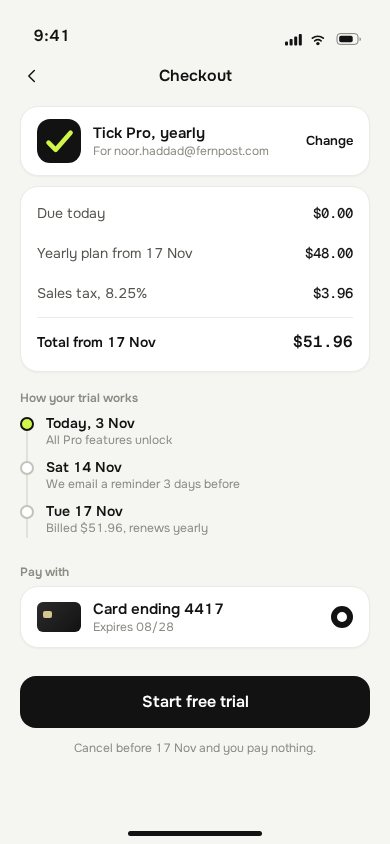
A checkout screen from Tick, a to-do lists and reminders app template in a Minimal style. Screen 21 of 25.
Tick is a complete to-do app: welcome, set up, sign in, a Today list with overdue tasks and a daily goal ring, inbox, an upcoming week strip, quick add with plain language dates, task details with subtasks, a date picker and reminders, projects as a list or a board, filters and labels, search, sharing, activity, productivity stats, templates, a Pro plan with checkout and confirmation, notifications, profile and settings. Paper white and ink with a single chartreuse accent.
| Detail | Value |
|---|---|
| Screen type | Checkout |
| App | Tick: To-do lists and reminders |
| Category | Productivity |
| Design language | Minimal, light |
| Type | Bricolage Grotesque for headings, Onest for text |
| Colours | #f5f5f1 background, #ffffff surface, #121212 text, #8b8b84 text-muted, #d2f54a accent, #121212 accent-contrast, #e8e7e0 border, #f2553a danger, #22914d success |
What this screen says
- Checkout
- Tick Pro, yearlyFor noor.haddad@fernpost.com
- Change
- Due today $0.00
- Yearly plan from 17 Nov $48.00
- Sales tax, 8.25% $3.96
- Total from 17 Nov $51.96
- How your trial works
- Today, 3 NovAll Pro features unlock
- Sat 14 NovWe email a reminder 3 days before
- Tue 17 NovBilled $51.96, renews yearly
- Pay with
- Card ending 4417Expires 08/28
- Start free trial
- Cancel before 17 Nov and you pay nothing.
Around it in Tick
More booking and checkout screens
- Streak Check in: Small days, long chains
- Daybook Find a time: Calendar and planner
- Inkwell Print a volume: Daily journal
- Shortlist Review application: Job search and application tracker
- Juno Checkout: AI chat assistant
- Opal Invoice: Studio dashboard
- Chrono Send invite: World clock, timers and stopwatch
- Frontdesk Refund: Customer support inbox
- Campaign Schedule: Email marketing campaigns
- Outpost Schedule: Schedule social posts
- Polish Checkout: Writing assistant and keyboard
- Tapline Send a tip: Link-in-bio pages and analytics
Every productivity app checkout screen
What makes a good checkout screen
- Show the total early and honestly. Taxes, delivery and service fees should appear before the last step. A higher total on the final screen feels like a trick.
- Offer wallet payments. Apple Pay and Google Pay skip card typing entirely. Show them first when they are available.
- Ask for the minimum. Only the fields needed to deliver or book. Save details for next time.
- Let people review before paying. A clear summary of items, dates, address and price, with each part editable without starting over.
The full checkout screen guide and every example
Remix Tick free: describe your own app and it is drawn in this design. Or get its files from $10: Figma, React Native, SwiftUI, Flutter and HTML.