Templates · Settings screens · Lifestyle app · Laced
Laced Settings screen
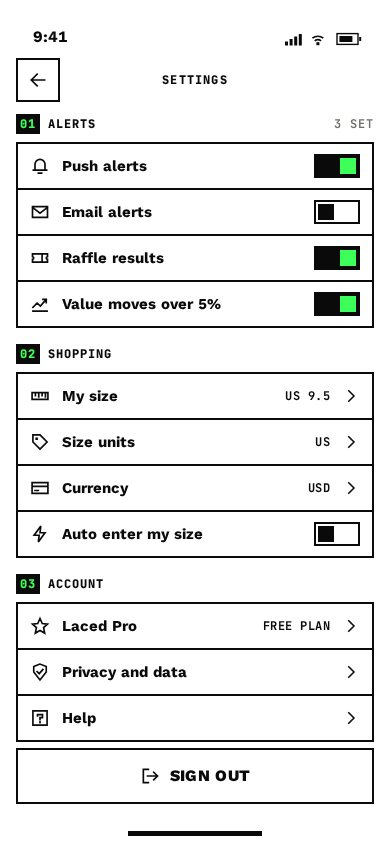
A settings screen from Laced, a sneaker drops and raffles app template in a Brutalist style. Screen 25 of 25.
Laced is a complete sneaker drops app: welcome, sign in, a code and size setup, a home with the next drop and a countdown, a drops calendar, the shoe page with sizes, a size guide, raffle entry and results, checkout, order tracking, search, a collection of owned pairs with resale value and a value chart, release alerts, a Pro plan, profile and settings. Everything sits on a hard black grid with neon green for whatever is live, selected or up in value.
| Detail | Value |
|---|---|
| Screen type | Settings |
| App | Laced: Sneaker drops and raffles |
| Category | Lifestyle |
| Design language | Brutalist, light |
| Type | Work Sans |
| Colours | #ffffff background, #f1f1ec surface, #0a0a0a text, #6e6e68 text-muted, #3dff5a accent, #0a0a0a accent-contrast, #0a0a0a secondary, #0a0a0a border, #ff3d1f danger |
What this screen says
- Settings
- 01Alerts3 set
- Push alerts
- Email alerts
- Raffle results
- Value moves over 5%
- 02Shopping
- My size
- US 9.5
- Size units
- US
- Currency
- USD
- Auto enter my size
- 03Account
- Laced Pro
- Free plan
- Privacy and data
- Help
- Sign out
Around it in Laced
More settings screens
- Roost Settings: Your shared house, stuck to the fridge door
- Trellis Settings: Vegetable garden planner
- Grain Settings: Camera and photo editor
- Posy Settings: Flower delivery and weekly stems
- Fern Settings: Plant care
- Doorstep Settings: Homes for sale and rent
- Rewear Settings: Secondhand fashion marketplace
- Gloss Settings: Salon and spa booking
- Vow Settings: Wedding planner
- Drizzle Settings: Weather with living skies
- Byline Settings: Daily news reader
- Shelf Settings: Reading tracker and book club
Every lifestyle app settings screen
What makes a good settings screen
- Group options into clear sections. Account, notifications, privacy, appearance and help, with headings, so people scan to the right group.
- Label settings by their effect. "Daily reminder at 8:00" is clearer than "Reminders". Add a short description under options that need one.
- Use the right control. Toggles for on and off, a row that opens a list for choices, and sliders only for ranges.
- Apply changes immediately. Most mobile settings take effect when changed, with no Save button to forget.
The full settings screen guide and every example
Remix Laced free: describe your own app and it is drawn in this design. Or get its files from $10: Figma, React Native, SwiftUI, Flutter and HTML.