Templates · Settings screens · Lifestyle app · Posy
Posy Settings screen
A settings screen from Posy, a flower delivery and weekly stems app template in a Luxury style. Screen 25 of 25.
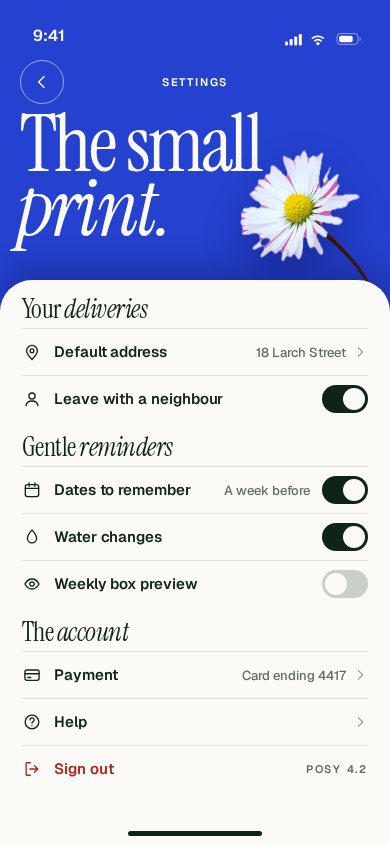
Posy is a complete flower shop: welcome, sign in and verify, a home with today's pick, a shop by colour and occasion, search, a bouquet page, a stem by stem bouquet builder, single flower pages, recipient, card message and delivery hour forms, basket, checkout, confirmation and live courier tracking, order history, a weekly subscription with its delivery calendar, a vase life tracker, dates to remember, notifications, profile and settings. Twenty eight flowers are true cut-outs sitting straight on the colour.
| Detail | Value |
|---|---|
| Screen type | Settings |
| App | Posy: Flower delivery and weekly stems |
| Category | Lifestyle |
| Design language | Luxury, light |
| Type | Geist |
| Colours | #e8432a background, #fbfaf6 surface, #0f2419 text, #5f6d63 text-muted, #0f2419 accent, #fbfaf6 accent-contrast, #f5a91e secondary, #e3e0d4 border, #b3261a danger |
What this screen says
- Settings
- The smallprint.
- Your deliveries
- Default address
- 18 Larch Street
- Leave with a neighbour
- Gentle reminders
- Dates to remember
- A week before
- Water changes
- Weekly box preview
- The account
- Payment
- Card ending 4417
- Help
- Sign outPosy 4.2
Around it in Posy
More settings screens
- Byline Settings: Daily news reader
- Shelf Settings: Reading tracker and book club
- Marquee Settings: Cinema tickets and watchlist
- Handy Settings: Home services
- Tasker Settings: Book and do local odd jobs
- Toolbox Settings: Hardware store and project lists
- Brief Settings: News in sixty words
- Kibble Settings: Pet supplies and autoship
- Filmlog Settings: Film diary and reviews
- Guardrail Content filters: Parental controls and screen time
- Collar Settings: GPS pet tracker
- Postage Settings: Send parcels and find drop-off points
Every lifestyle app settings screen
What makes a good settings screen
- Group options into clear sections. Account, notifications, privacy, appearance and help, with headings, so people scan to the right group.
- Label settings by their effect. "Daily reminder at 8:00" is clearer than "Reminders". Add a short description under options that need one.
- Use the right control. Toggles for on and off, a row that opens a list for choices, and sliders only for ranges.
- Apply changes immediately. Most mobile settings take effect when changed, with no Save button to forget.
The full settings screen guide and every example
Remix Posy free: describe your own app and it is drawn in this design. Or get its files from $10: Figma, React Native, SwiftUI, Flutter and HTML.