Templates · Home screens · Sports app · Cairn
Cairn Explore screen
A home screen from Cairn, a sports app template in a Minimal style. Screen 4 of 25.
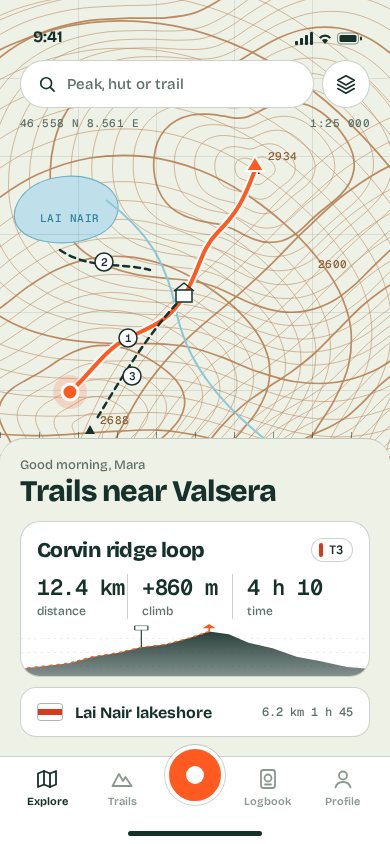
Cairn is a complete hiking app: welcome and sign in, a contour map of trails, a trail list, trail detail with an elevation profile, a full profile by segment, conditions by altitude, offline maps and region downloads, a gear checklist, a pre-start check, live recording, pause and summary, a logbook of summit stamps, yearly stats, route planning, mountain huts, safety sharing, a Plus plan, profile and settings. Every map, chart and stamp is drawn.
| Detail | Value |
|---|---|
| Screen type | Home |
| App | Cairn: Trails, contours and summits on one map sheet |
| Category | Sports |
| Design language | Minimal, light |
| Type | Bricolage Grotesque |
| Colours | #eef1e6 background, #ffffff surface, #16302a text, #5d7068 text-muted, #ff5a1f accent, #ffffff accent-contrast, #b9855a secondary, #c9d2c4 border, #d63a1a danger |
What this screen says
- Peak, hut or trail
- 46.558 N 8.561 E 1:25 000
- Good morning, Mara
- Trails near Valsera
- Corvin ridge loop
- T3
- 12.4 kmdistance
- +860 mclimb
- 4 h 10time
- Lai Nair lakeshore6.2 km 1 h 45
- Explore
- Trails
- Logbook
- Profile
Around it in Cairn
More home screens
- Oche Home: Darts scorer and leagues
- Lapse Home: Swim training
- Angler Today: A fishing log drawn on the depth chart
- Piste Home: Ski resort companion
- Crag Home: Climbing gym logbook
- Fairway Home: Golf course guide and scorecard
- Matchday Home: Football scores and fantasy
- Rally Home: Tennis and padel club
- Swell Home: Surf forecast
- Pitwall Mission control: Race engineering
- Elevens Home: Fantasy cricket leagues
- Scoreboard Scores: Scores and news for every sport
What makes a good home screen
- Put the most important thing first. Decide the one thing most people come for, like today's workout, a balance or the next booking, and give it the top of the screen.
- Make it feel current. Greetings with the time of day, today's date, fresh numbers and recent activity tell people the app is alive and about them.
- Keep quick actions within thumb reach. The two or three things people do most should be one tap away, in the lower part of the screen or a floating button.
- Group related content in clear sections. Use headings and spacing so the screen scans as a few blocks, not a long mixed list.
The full home screen guide and every example
Remix Cairn free: describe your own app and it is drawn in this design. Or get its files from $10: Figma, React Native, SwiftUI, Flutter and HTML.