Templates · Settings screens · Lifestyle app · Fade
Fade Settings screen
A settings screen from Fade, a barber booking app template in a Neubrutalism style. Screen 25 of 25.
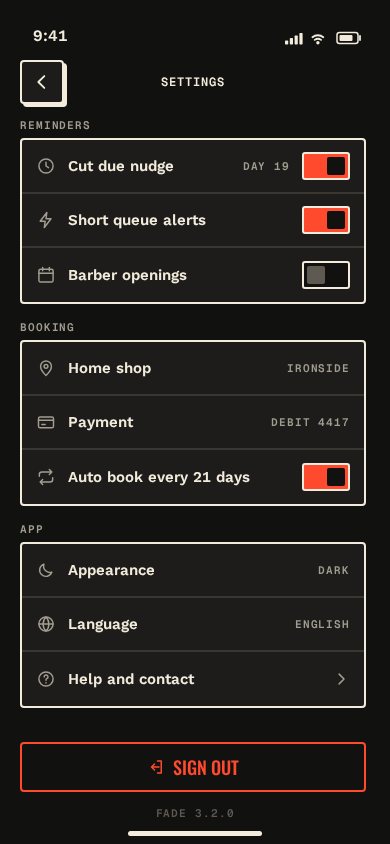
Fade is a complete barber booking app: welcome, sign in and a code, a home that knows when you are due, a map of shops nearby, search, a shop with its chairs and menu, a barber with a portfolio, a lookbook and a fade map for each style, services, a time picker, cut notes with guard numbers, review and a booked ticket, bookings and an appointment, a live walk in queue, rating with a tip, a cut log, a punch card, Fade Pass, notifications, profile and settings. Ink black, cream, pole red and cobalt.
| Detail | Value |
|---|---|
| Screen type | Settings |
| App | Fade: Barber booking |
| Category | Lifestyle |
| Design language | Neubrutalism, dark |
| Type | Oswald for headings, Work Sans for text |
| Colours | #111110 background, #1d1c1a surface, #f3ecdd text, #a39d90 text-muted, #ff4a2e accent, #111110 accent-contrast, #3b63ff secondary, #f3ecdd border, #3fdc9a success |
What this screen says
- Settings
- Reminders
- Cut due nudge
- Day 19
- Short queue alerts
- Barber openings
- Booking
- Home shop
- Ironside
- Payment
- Debit 4417
- Auto book every 21 days
- App
- Appearance
- Dark
- Language
- English
- Help and contact
- Sign out
- Fade 3.2.0
Around it in Fade
More settings screens
- Filmlog Settings: Film diary and reviews
- Guardrail Content filters: Parental controls and screen time
- Collar Settings: GPS pet tracker
- Postage Settings: Send parcels and find drop-off points
- Specs Settings: Glasses with virtual try-on
- Circuit Settings: Electronics store with trade-in and repairs
- Provenance Settings: Authenticated luxury resale
- Gavel Settings: Live online auctions
- Tidy Settings: Book home cleaners
- Dorm Settings: Find student housing
- Hem Settings: Tailoring and alterations, collected
- Lendly Settings: Borrow things from neighbours
Every lifestyle app settings screen
What makes a good settings screen
- Group options into clear sections. Account, notifications, privacy, appearance and help, with headings, so people scan to the right group.
- Label settings by their effect. "Daily reminder at 8:00" is clearer than "Reminders". Add a short description under options that need one.
- Use the right control. Toggles for on and off, a row that opens a list for choices, and sliders only for ranges.
- Apply changes immediately. Most mobile settings take effect when changed, with no Save button to forget.
The full settings screen guide and every example
Remix Fade free: describe your own app and it is drawn in this design. Or get its files from $10: Figma, React Native, SwiftUI, Flutter and HTML.