Templates · Home screens · Sports app · Crag
Crag Home screen
A home screen from Crag, a climbing gym logbook app template in a Neubrutalism style. Screen 5 of 25.
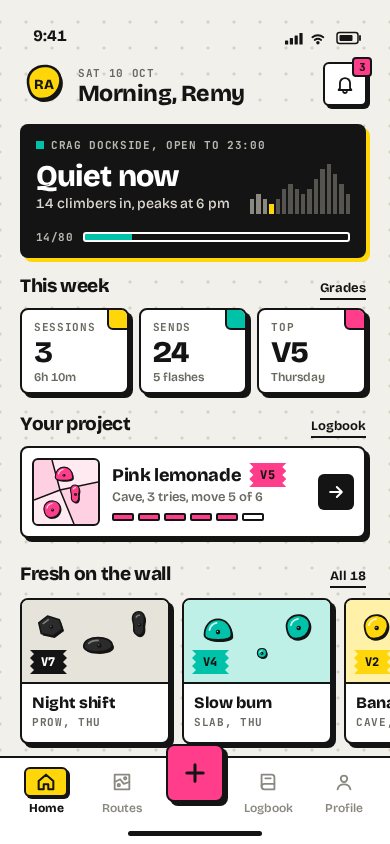
Crag is a complete climbing gym app: welcome, sign in and a code check, picking your level, a home with how busy the gym is and this week's climbing, the gym, a wall topo with every problem on it, route search, a route with its holds and beta, logging a send, a live session, the logbook, a session recap, the grades pyramid, progress, a training plan with a hangboard timer, the leaderboard, a climber, the membership pass, plans, notifications, profile and settings. Chalk white with pink, teal and yellow holds and black outlines.
| Detail | Value |
|---|---|
| Screen type | Home |
| App | Crag: Climbing gym logbook |
| Category | Sports |
| Design language | Neubrutalism, light |
| Type | Bricolage Grotesque |
| Colours | #f1f0ea background, #ffffff surface, #141414 text, #6a6962 text-muted, #ff3d8b accent, #141414 accent-contrast, #00c2a8 secondary, #141414 border, #f0421c danger |
What this screen says
- Sat 10 Oct
- Morning, Remy
- Crag Dockside, open to 23:00
- Quiet now
- 14 climbers in, peaks at 6 pm
- This weekGrades
- Sessions 36h 10m
- Sends 245 flashes
- Top V5Thursday
- Your projectLogbook
- Pink lemonadeV5
- Cave, 3 tries, move 5 of 6
- Fresh on the wallAll 18
- V7
- Night shift
- Prow, Thu
- V4
- Slow burn
- Slab, Thu
- V2
- Banana split
- Cave, Fri
- Home
- Routes
- Logbook
- Profile
Around it in Crag
More home screens
- Eddy Today: River levels for paddlers
- Whistle Home: Grassroots league manager for coaches
- Oche Home: Darts scorer and leagues
- Cairn Explore: Trails, contours and summits on one map sheet
- Lapse Home: Swim training
- Angler Today: A fishing log drawn on the depth chart
- Piste Home: Ski resort companion
- Fairway Home: Golf course guide and scorecard
- Matchday Home: Football scores and fantasy
- Rally Home: Tennis and padel club
- Swell Home: Surf forecast
- Pitwall Mission control: Race engineering
What makes a good home screen
- Put the most important thing first. Decide the one thing most people come for, like today's workout, a balance or the next booking, and give it the top of the screen.
- Make it feel current. Greetings with the time of day, today's date, fresh numbers and recent activity tell people the app is alive and about them.
- Keep quick actions within thumb reach. The two or three things people do most should be one tap away, in the lower part of the screen or a floating button.
- Group related content in clear sections. Use headings and spacing so the screen scans as a few blocks, not a long mixed list.
The full home screen guide and every example
Remix Crag free: describe your own app and it is drawn in this design. Or get its files from $10: Figma, React Native, SwiftUI, Flutter and HTML.