Templates · Sign in and sign up screens · Sports app · Cairn
Cairn Create account screen
A sign in screen from Cairn, a sports app template in a Minimal style. Screen 3 of 25.
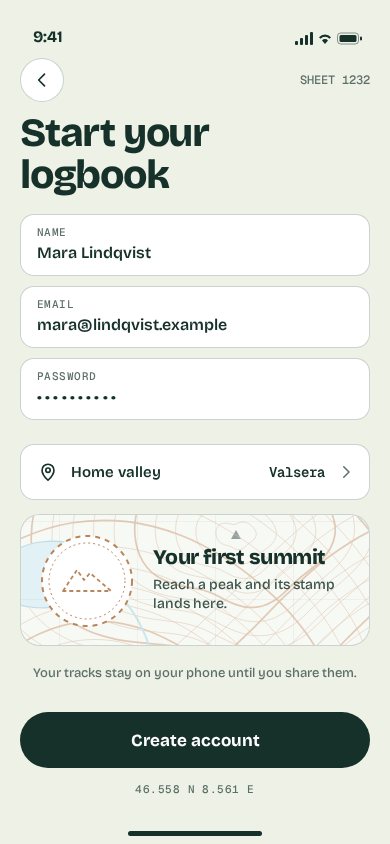
Cairn is a complete hiking app: welcome and sign in, a contour map of trails, a trail list, trail detail with an elevation profile, a full profile by segment, conditions by altitude, offline maps and region downloads, a gear checklist, a pre-start check, live recording, pause and summary, a logbook of summit stamps, yearly stats, route planning, mountain huts, safety sharing, a Plus plan, profile and settings. Every map, chart and stamp is drawn.
| Detail | Value |
|---|---|
| Screen type | Sign in |
| App | Cairn: Trails, contours and summits on one map sheet |
| Category | Sports |
| Design language | Minimal, light |
| Type | Bricolage Grotesque |
| Colours | #eef1e6 background, #ffffff surface, #16302a text, #5d7068 text-muted, #ff5a1f accent, #ffffff accent-contrast, #b9855a secondary, #c9d2c4 border, #d63a1a danger |
What this screen says
- SHEET 1232
- Start your
- logbook
- NAME Mara Lindqvist
- EMAIL mara@lindqvist.example
- PASSWORD ••••••••••
- Home valleyValsera
- Your first summit
- Reach a peak and its stamp lands here.
- Your tracks stay on your phone until you share them.
- Create account
- 46.558 N 8.561 E
Around it in Cairn
More sign in and sign up screens
- Swell Sign in: Surf forecast
- Pitwall Sign in: Race engineering
- Elevens Sign in: Fantasy cricket leagues
- Scoreboard Sign in: Scores and news for every sport
- Bib Sign in: Find and enter races
- Wicket Sign in: Live cricket scores
- Courtside Sign in: Pickup basketball games
- Tack Sign in: Sailing wind and regatta tracker
- Frag Sign in: Esports tournaments and teams
- Canter Sign in: Riding stables and lessons
- Ollie Sign in: Skate spots and clips
- Eddy Sign in: River levels for paddlers
Every sports app sign in screen
What makes a good login screen
- Offer the fastest option first. Sign in with Apple, Google or a passkey takes one tap. If you support them, put them above the email form. Apple asks apps that use a third-party login like Google to also offer an equivalent privacy-focused option, such as Sign in with Apple.
- Separate sign in from sign up clearly. Use different headings and buttons, and a clear link to switch. People who already have an account should never end up creating a second one by accident.
- Use the right keyboard and autofill. Email fields should open the email keyboard and support password managers and one-time code autofill. Small details, big difference in how many people get through.
- Write errors that help. "That password doesn't match this email" is better than "Error 401". Keep what people typed so they only fix the part that was wrong.
The full login screen guide and every example
Remix Cairn free: describe your own app and it is drawn in this design. Or get its files from $10: Figma, React Native, SwiftUI, Flutter and HTML.