Templates · Home screens · Food app · Brewly
Brewly Home screen
A home screen from Brewly, a coffee ordering and loyalty app template in a Minimal style. Screen 4 of 25.
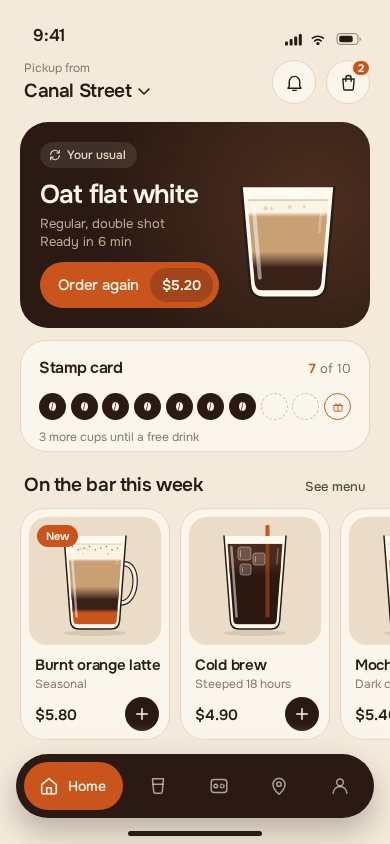
Brewly is a complete coffee shop app: welcome, sign in and a code, a home with the usual order and the stamp card, the menu, search, a drink page, a customiser that redraws the glass layer by layer, the bag, pickup time, payment, a confirmation and live order status, the stamp card, rewards, a stores map and a store page, gift cards, order history, a year in cups, a monthly club plan, notifications, profile and settings. Every drink is drawn in side view with its layers, and one burnt orange marks whatever is selected, ready or earned.
| Detail | Value |
|---|---|
| Screen type | Home |
| App | Brewly: Coffee ordering and loyalty |
| Category | Food |
| Design language | Minimal, light |
| Type | Onest |
| Colours | #f3eadb background, #fbf6ec surface, #2a1a13 text, #8c7767 text-muted, #c9541c accent, #fff8ee accent-contrast, #c59a6c secondary, #e3d6c2 border, #b3361f danger |
What this screen says
- Pickup from Canal Street
- Your usual
- Oat flat white
- Regular, double shot
- Ready in 6 min
- Order again$5.20
- Stamp card7 of 10
- 3 more cups until a free drink
- On the bar this weekSee menu
- New
- Burnt orange latteSeasonal
- Cold brewSteeped 18 hours
- MochaDark chocolate
- Home
Around it in Brewly
More home screens
- Queue Home: Join the waitlist from anywhere
- Nosh Home: Local restaurant reviews
- Buns Home: Burger chain ordering and deals
- Slice Home: Pizza ordering with a live tracker
- Crate Home: Meal kits delivered weekly
- Dash Home: Ten minute grocery delivery
- Aisle Lists: Shared grocery lists
- Menu Table: Scan, order and pay at the table
- Mart Home: Supermarket app with loyalty and scan and go
- Rescue Discover: Surprise bags of surplus food
- Omakase Home: Chef's counter reservations
- Lunchbox Today: School lunch planner for parents
What makes a good home screen
- Put the most important thing first. Decide the one thing most people come for, like today's workout, a balance or the next booking, and give it the top of the screen.
- Make it feel current. Greetings with the time of day, today's date, fresh numbers and recent activity tell people the app is alive and about them.
- Keep quick actions within thumb reach. The two or three things people do most should be one tap away, in the lower part of the screen or a floating button.
- Group related content in clear sections. Use headings and spacing so the screen scans as a few blocks, not a long mixed list.
The full home screen guide and every example
Remix Brewly free: describe your own app and it is drawn in this design. Or get its files from $10: Figma, React Native, SwiftUI, Flutter and HTML.