Templates · Home screens · Food app · Rescue
Rescue Discover screen
A home screen from Rescue, a surprise bags of surplus food app template in a Playful style. Screen 5 of 25.
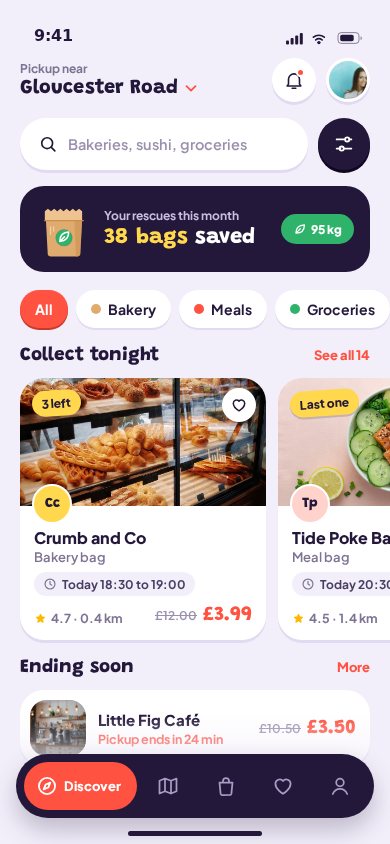
Rescue is a complete surplus food app: welcome and how it works, sign in, a pickup area with a radius, a discover home with tonight's bags, a map of price pins, search and filters, a category list, a bag page with pickup window, price against value and what might be inside, a shop page, reserve, payment and a reserved ticket, orders, a live pickup screen with a swipe to collect, a collected moment, rating, an impact dashboard, saved shops, notifications, a membership plan, invites, profile and settings. Lilac and white with tomato red, butter yellow and kraft paper bags.
| Detail | Value |
|---|---|
| Screen type | Home |
| App | Rescue: Surprise bags of surplus food |
| Category | Food |
| Design language | Playful, light |
| Type | Grandstander for headings, Plus Jakarta Sans for text |
| Colours | #f3effa background, #ffffff surface, #23173a text, #7d7393 text-muted, #ff5240 accent, #ffffff accent-contrast, #ffd84d secondary, #e2daf0 border, #2fb36a success, #e0ab6e kraft |
What this screen says
- Pickup near
- Gloucester Road
- Bakeries, sushi, groceries
- Your rescues this month
- 38 bags saved
- 95 kg
- All Bakery Meals Groceries Café
- Collect tonight
- See all 14
- 3 left Cc
- Crumb and Co
- Bakery bag
- Today 18:30 to 19:00
- 4.7 · 0.4 km £12.00£3.99
- Last one Tp
- Tide Poke Bar
- Meal bag
- Today 20:30 to 21:00
- 4.5 · 1.4 km £15.00£4.99
- Ending soon
- More
- Little Fig Café
- Pickup ends in 24 min
- Discover
Around it in Rescue
More home screens
- Dash Home: Ten minute grocery delivery
- Aisle Lists: Shared grocery lists
- Menu Table: Scan, order and pay at the table
- Mart Home: Supermarket app with loyalty and scan and go
- Omakase Home: Chef's counter reservations
- Lunchbox Today: School lunch planner for parents
- Agave Tonight: Cocktails and home bar
- Crock Today: Fermentation and sourdough starter log
- Curbside Home: Street food and food truck finder
- Forage Home: Farmers market and veg box
- Ember Home: Smoker and grill thermometer
- Steep Today: Tea brewing and tasting notes
What makes a good home screen
- Put the most important thing first. Decide the one thing most people come for, like today's workout, a balance or the next booking, and give it the top of the screen.
- Make it feel current. Greetings with the time of day, today's date, fresh numbers and recent activity tell people the app is alive and about them.
- Keep quick actions within thumb reach. The two or three things people do most should be one tap away, in the lower part of the screen or a floating button.
- Group related content in clear sections. Use headings and spacing so the screen scans as a few blocks, not a long mixed list.
The full home screen guide and every example
Remix Rescue free: describe your own app and it is drawn in this design. Or get its files from $10: Figma, React Native, SwiftUI, Flutter and HTML.