Templates · Home screens · Food app · Lunchbox
Lunchbox Today screen
A home screen from Lunchbox, a school lunch planner for parents app template in a Playful style. Screen 4 of 25.
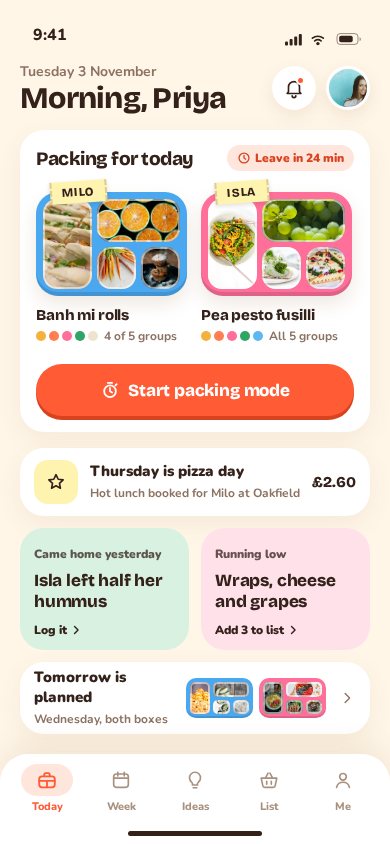
Lunchbox is a complete school lunch planner: welcome, adding your kids with allergies and school rules, sign in, a today screen with each child's bento box, a week plan, building a box compartment by compartment, smart swaps, ideas, search and recipes, the school's hot lunch menu, pantry, a shopping list with grocery checkout and confirmation, a morning packing mode with a timer and a packed screen, a camera to snap the box, the after school lunch report, a food group balance dashboard, a child profile, notifications, a Plus plan, profile and settings. Cream and white with tomato, sky and berry.
| Detail | Value |
|---|---|
| Screen type | Home |
| App | Lunchbox: School lunch planner for parents |
| Category | Food |
| Design language | Playful, light |
| Type | Bricolage Grotesque for headings, Nunito for text |
| Colours | #fff6e8 background, #ffffff surface, #33211a text, #8c7262 text-muted, #ff5b35 accent, #ffffff accent-contrast, #4aa8f0 secondary, #f0dfc8 border, #e5484d danger |
What this screen says
- Tuesday 3 November
- Morning, Priya
- Packing for today Leave in 24 min
- Milo
- Banh mi rolls
- 4 of 5 groups
- Isla
- Pea pesto fusilli
- All 5 groups
- Start packing mode
- Thursday is pizza dayHot lunch booked for Milo at Oakfield
- Came home yesterdayIsla left half her hummusLog it
- Running lowWraps, cheese and grapesAdd 3 to list
- Tomorrow is plannedWednesday, both boxes
- Today
- Week
- Ideas
- List
- Me
Around it in Lunchbox
More home screens
- Brigade Service: Restaurant kitchen and line ops
- Nibs Home: Food allergy and label scanner
- Ladle Home: Recipes and meal planning
- Pantry Home: Grocery delivery
- Brewly Home: Coffee ordering and loyalty
- Tabla Home: Tables worth dressing for
- Corked Home: Wine journal and cellar
- Crumb Home: Neighbourhood bakery
- Tiffin Home: Food delivery
- Courier Home: Food delivery driver app
- Picker Batches: Grocery shopper app
- Queue Home: Join the waitlist from anywhere
What makes a good home screen
- Put the most important thing first. Decide the one thing most people come for, like today's workout, a balance or the next booking, and give it the top of the screen.
- Make it feel current. Greetings with the time of day, today's date, fresh numbers and recent activity tell people the app is alive and about them.
- Keep quick actions within thumb reach. The two or three things people do most should be one tap away, in the lower part of the screen or a floating button.
- Group related content in clear sections. Use headings and spacing so the screen scans as a few blocks, not a long mixed list.
The full home screen guide and every example
Remix Lunchbox free: describe your own app and it is drawn in this design. Or get its files from $10: Figma, React Native, SwiftUI, Flutter and HTML.