Templates · Home screens · Food app · Nosh
Nosh Home screen
A home screen from Nosh, a local restaurant reviews app template in a Minimal style. Screen 4 of 25.
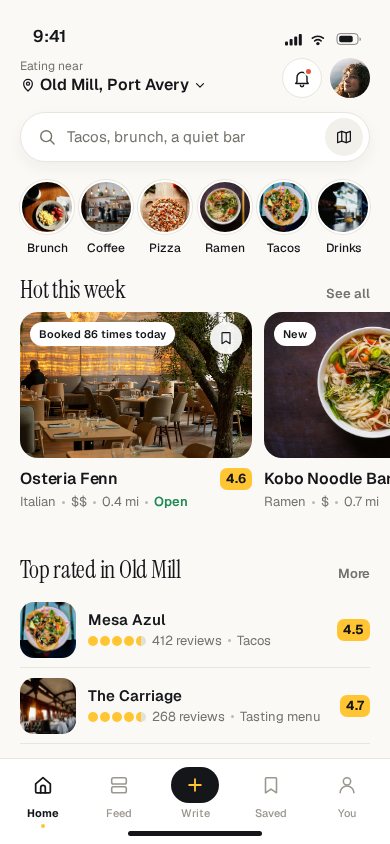
Nosh is a complete local restaurant reviews app: welcome, taste picks, sign in, a home with nearby picks and categories, search, results with photo strips, a map with score pins, a restaurant page with booking slots, the menu, a photo viewer, reviews with a score histogram, a single review with the owner reply, writing a review, booking a table with confirmation and a ticket, a live waitlist, saved lists, a friends feed, a year in food, notifications, a Plus plan, profile and settings. Warm paper and white with ink and saffron.
| Detail | Value |
|---|---|
| Screen type | Home |
| App | Nosh: Local restaurant reviews |
| Category | Food |
| Design language | Minimal, light |
| Type | Instrument Serif for headings, Geist for text |
| Colours | #faf9f6 background, #ffffff surface, #15161a text, #74726b text-muted, #ffc533 accent, #15161a accent-contrast, #fff3cf secondary, #e8e5dd border, #e5533a danger |
What this screen says
- Eating near Old Mill, Port Avery
- Tacos, brunch, a quiet bar
- Brunch
- Coffee
- Pizza
- Ramen
- Tacos
- Drinks
- Hot this week
- See all
- Booked 86 times today
- Osteria Fenn4.6
- Italian$$0.4 miOpen
- New
- Kobo Noodle Bar4.4
- Ramen$0.7 mi
- Top rated in Old Mill
- More
- Mesa Azul
- 412 reviewsTacos
- The Carriage
- 268 reviewsTasting menu
- Home
- Feed
- Write
- Saved
- You
Around it in Nosh
More home screens
- Pantry Home: Grocery delivery
- Brewly Home: Coffee ordering and loyalty
- Tabla Home: Tables worth dressing for
- Corked Home: Wine journal and cellar
- Crumb Home: Neighbourhood bakery
- Tiffin Home: Food delivery
- Courier Home: Food delivery driver app
- Picker Batches: Grocery shopper app
- Queue Home: Join the waitlist from anywhere
- Buns Home: Burger chain ordering and deals
- Slice Home: Pizza ordering with a live tracker
- Crate Home: Meal kits delivered weekly
What makes a good home screen
- Put the most important thing first. Decide the one thing most people come for, like today's workout, a balance or the next booking, and give it the top of the screen.
- Make it feel current. Greetings with the time of day, today's date, fresh numbers and recent activity tell people the app is alive and about them.
- Keep quick actions within thumb reach. The two or three things people do most should be one tap away, in the lower part of the screen or a floating button.
- Group related content in clear sections. Use headings and spacing so the screen scans as a few blocks, not a long mixed list.
The full home screen guide and every example
Remix Nosh free: describe your own app and it is drawn in this design. Or get its files from $10: Figma, React Native, SwiftUI, Flutter and HTML.