Templates · Home screens · Food app · Omakase
Omakase Home screen
A home screen from Omakase, a chef's counter reservations app template in a Luxury style. Screen 4 of 25.
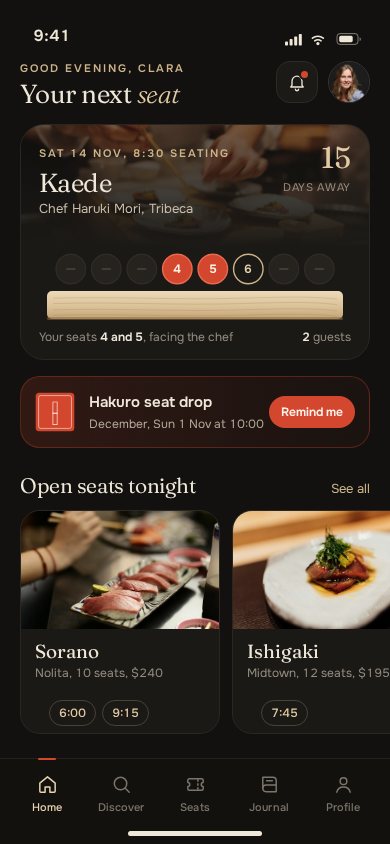
Omakase is a complete chef's counter booking app: welcome, your palate and allergies, sign in, a home with your next seat and the next seat drop, discover, a counter page, the chef, tonight's courses, a seat picker on a drawn hinoki counter, date and seating, guests and notes, review and pay, a sealed confirmation, reservations, a reservation ticket, waitlist alerts, a live course tracker at the counter, a tasting journal and notes, a passport of seals and stats, saved counters, a Reserve membership, notifications, profile and settings. Sumi ink and hinoki wood with one vermilion accent.
| Detail | Value |
|---|---|
| Screen type | Home |
| App | Omakase: Chef's counter reservations |
| Category | Food |
| Design language | Luxury, dark |
| Type | Fraunces for headings, Onest for text |
| Colours | #12110f background, #1b1916 surface, #efe7d8 text, #968d7f text-muted, #d4472f accent, #fff4ea accent-contrast, #e2cba3 secondary, #2a2722 border, #e0604a danger |
What this screen says
- Good evening, Clara
- Your next seat
- Sat 14 Nov, 8:30 seating
- Kaede
- Chef Haruki Mori, Tribeca
- 15DAYS AWAY
- Your seats 4 and 5, facing the chef 2 guests
- Hakuro seat drop
- December, Sun 1 Nov at 10:00
- Remind me
- Open seats tonight
- See all
- Sorano
- Nolita, 10 seats, $240
- Ishigaki
- Midtown, 12 seats, $195
- Home
- Discover
- Seats
- Journal
- Profile
Around it in Omakase
More home screens
- Dash Home: Ten minute grocery delivery
- Aisle Lists: Shared grocery lists
- Menu Table: Scan, order and pay at the table
- Mart Home: Supermarket app with loyalty and scan and go
- Rescue Discover: Surprise bags of surplus food
- Lunchbox Today: School lunch planner for parents
- Agave Tonight: Cocktails and home bar
- Crock Today: Fermentation and sourdough starter log
- Curbside Home: Street food and food truck finder
- Forage Home: Farmers market and veg box
- Ember Home: Smoker and grill thermometer
- Steep Today: Tea brewing and tasting notes
What makes a good home screen
- Put the most important thing first. Decide the one thing most people come for, like today's workout, a balance or the next booking, and give it the top of the screen.
- Make it feel current. Greetings with the time of day, today's date, fresh numbers and recent activity tell people the app is alive and about them.
- Keep quick actions within thumb reach. The two or three things people do most should be one tap away, in the lower part of the screen or a floating button.
- Group related content in clear sections. Use headings and spacing so the screen scans as a few blocks, not a long mixed list.
The full home screen guide and every example
Remix Omakase free: describe your own app and it is drawn in this design. Or get its files from $10: Figma, React Native, SwiftUI, Flutter and HTML.