Templates · Home screens · Food app · Queue
Queue Home screen
A home screen from Queue, a join the waitlist from anywhere app template in a Neubrutalism style. Screen 4 of 25.
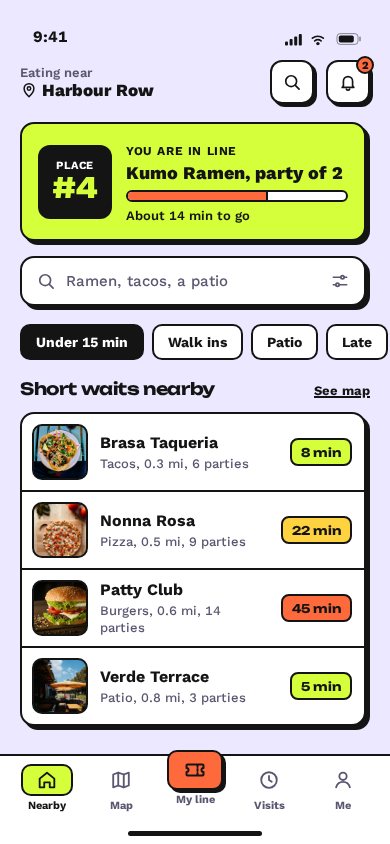
Queue is a complete restaurant waitlist app: welcome, phone sign in and code, a nearby home with your live place and short waits, a map of wait pins, search with wait and party filters, a restaurant page with busy hours, party size, review and a joined screen, a live place in line with a countdown ring, drinks to pre-order and pay for, running late or leave the line, a table ready hold timer, wait alerts, wait trends, visit history and a visit, favourites, a host view, a Plus plan, notifications, profile and settings. Lavender and white with ink outlines, tomato, lime, yellow and sky.
| Detail | Value |
|---|---|
| Screen type | Home |
| App | Queue: Join the waitlist from anywhere |
| Category | Food |
| Design language | Neubrutalism, light |
| Type | Unbounded for headings, Work Sans for text |
| Colours | #ece8ff background, #ffffff surface, #141414 text, #5b5670 text-muted, #ff6a3d accent, #141414 accent-contrast, #d4ff3a secondary, #141414 border, #ffd23f warning, #7ad3ff info, #c43414 danger |
What this screen says
- Eating near Harbour Row
- PLACE#4
- You are in lineKumo Ramen, party of 2
- About 14 min to go
- Ramen, tacos, a patio
- Under 15 min
- Walk ins
- Patio
- Late
- Short waits nearby
- See map
- Brasa TaqueriaTacos, 0.3 mi, 6 parties
- 8 min
- Nonna RosaPizza, 0.5 mi, 9 parties
- 22 min
- Patty ClubBurgers, 0.6 mi, 14 parties
- 45 min
- Verde TerracePatio, 0.8 mi, 3 parties
- 5 min
- Nearby
- Map
- My line
- Visits
- Me
Around it in Queue
More home screens
- Corked Home: Wine journal and cellar
- Crumb Home: Neighbourhood bakery
- Tiffin Home: Food delivery
- Courier Home: Food delivery driver app
- Picker Batches: Grocery shopper app
- Nosh Home: Local restaurant reviews
- Buns Home: Burger chain ordering and deals
- Slice Home: Pizza ordering with a live tracker
- Crate Home: Meal kits delivered weekly
- Dash Home: Ten minute grocery delivery
- Aisle Lists: Shared grocery lists
- Menu Table: Scan, order and pay at the table
What makes a good home screen
- Put the most important thing first. Decide the one thing most people come for, like today's workout, a balance or the next booking, and give it the top of the screen.
- Make it feel current. Greetings with the time of day, today's date, fresh numbers and recent activity tell people the app is alive and about them.
- Keep quick actions within thumb reach. The two or three things people do most should be one tap away, in the lower part of the screen or a floating button.
- Group related content in clear sections. Use headings and spacing so the screen scans as a few blocks, not a long mixed list.
The full home screen guide and every example
Remix Queue free: describe your own app and it is drawn in this design. Or get its files from $10: Figma, React Native, SwiftUI, Flutter and HTML.