Templates · Home screens · Food app · Menu
Menu Table screen
A home screen from Menu, a food app template in a Minimal style. Screen 4 of 25.
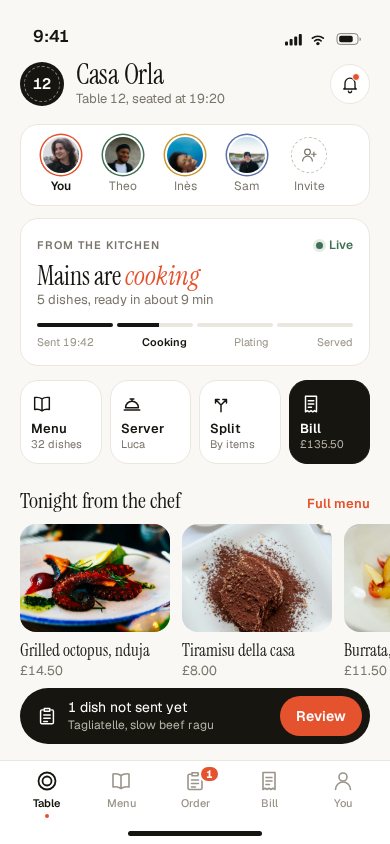
Menu is a complete scan, order and pay app: welcome, a camera that reads the table code, sign in, a table home with who has joined and what the kitchen is doing, a printed style menu, search with allergen filters, a dish with options and a note for the kitchen, the table's shared order, live order status, calling a server, the bill, splitting by items, tip, pay, a receipt, rewards, past visits, a Plus plan, notifications, profile and settings. Paper white and ink with tomato red and sage.
| Detail | Value |
|---|---|
| Screen type | Home |
| App | Menu: Scan, order and pay at the table |
| Category | Food |
| Design language | Minimal, light |
| Type | Instrument Serif for headings, Geist for text |
| Colours | #faf8f4 background, #ffffff surface, #16150f text, #7a766c text-muted, #e4522e accent, #ffffff accent-contrast, #3f6f55 secondary, #ebe7de border, #d93b2b danger |
What this screen says
- Casa Orla
- Table 12, seated at 19:20
- You
- Theo
- Inès
- Sam
- Invite
- From the kitchen Live
- Mains are cooking
- 5 dishes, ready in about 9 min
- Sent 19:42 CookingPlating Served
- Menu32 dishes
- ServerLuca
- SplitBy items
- Bill£135.50
- Tonight from the chef
- Full menu
- Grilled octopus, nduja
- £14.50
- Tiramisu della casa
- £8.00
- Burrata, peach
- £11.50
- 1 dish not sent yetTagliatelle, slow beef ragu
- Review
- Table
- Menu
- Order1
- Bill
Around it in Menu
More home screens
- Crumb Home: Neighbourhood bakery
- Tiffin Home: Food delivery
- Courier Home: Food delivery driver app
- Picker Batches: Grocery shopper app
- Queue Home: Join the waitlist from anywhere
- Nosh Home: Local restaurant reviews
- Buns Home: Burger chain ordering and deals
- Slice Home: Pizza ordering with a live tracker
- Crate Home: Meal kits delivered weekly
- Dash Home: Ten minute grocery delivery
- Aisle Lists: Shared grocery lists
- Mart Home: Supermarket app with loyalty and scan and go
What makes a good home screen
- Put the most important thing first. Decide the one thing most people come for, like today's workout, a balance or the next booking, and give it the top of the screen.
- Make it feel current. Greetings with the time of day, today's date, fresh numbers and recent activity tell people the app is alive and about them.
- Keep quick actions within thumb reach. The two or three things people do most should be one tap away, in the lower part of the screen or a floating button.
- Group related content in clear sections. Use headings and spacing so the screen scans as a few blocks, not a long mixed list.
The full home screen guide and every example
Remix Menu free: describe your own app and it is drawn in this design. Or get its files from $10: Figma, React Native, SwiftUI, Flutter and HTML.