Templates · Home screens · Productivity app · Branch
Branch Home screen
A home screen from Branch, a mind maps app template in a Playful style. Screen 4 of 25.
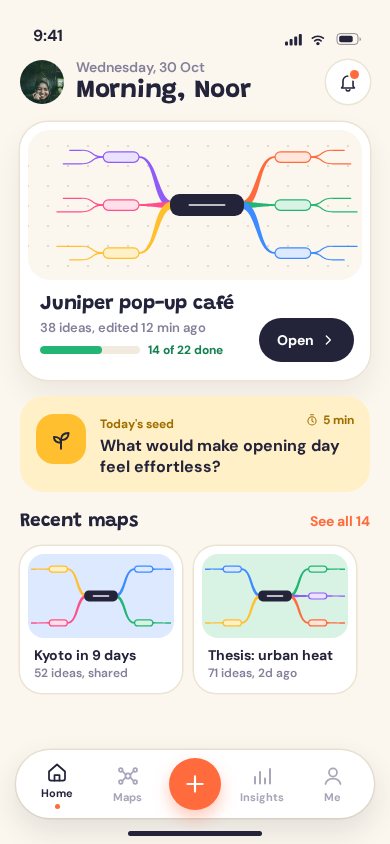
Branch is a complete mind mapping app: welcome, a pick your first map step, sign in, a home with the map you are growing and a daily seed prompt, a library of maps, search across ideas and notes, a full canvas editor, an idea with photos, notes and a checklist, adding a branch, map style, an outline view, a timed idea sprint, AI sprouts, templates and a template preview, sharing, a live session with cursors and a huddle, comments, export to a PDF poster and its success screen, insights, a Plus plan, notifications, profile and settings. Warm paper and ink with six bright branch colours.
| Detail | Value |
|---|---|
| Screen type | Home |
| App | Branch: Mind maps |
| Category | Productivity |
| Design language | Playful, light |
| Type | Grandstander for headings, DM Sans for text |
| Colours | #fbf7ee background, #ffffff surface, #23233a text, #85809a text-muted, #ff6b3d accent, #ffffff accent-contrast, #22b573 secondary, #ece4d3 border, #ff4f8b danger |
What this screen says
- Wednesday, 30 Oct
- Morning, Noor
- Juniper pop-up café
- 38 ideas, edited 12 min ago
- 14 of 22 done
- Open
- Today's seed
- What would make opening day feel effortless?
- 5 min
- Recent mapsSee all 14
- Kyoto in 9 days52 ideas, shared
- Thesis: urban heat71 ideas, 2d ago
- Home
- Maps
- Insights
- Me
Around it in Branch
More home screens
- Layout Home: Design anything from templates
- Tick Today: To-do lists and reminders
- Beacon People: Find your devices and people
- Staffroom Home: HR, payslips and time off
- Slot Home: Booking links and meeting scheduling
- Sheet Home: Spreadsheets and databases
- Tunnel Home: VPN and online privacy
- Ping Home: Internet speed test
- Glance Home: Visual search with the camera
- Replay Home: Record and share screen videos
- Easel Boards: Collaborative whiteboard
- Token Codes: Two-factor codes and sign-in approvals
Every productivity app home screen
What makes a good home screen
- Put the most important thing first. Decide the one thing most people come for, like today's workout, a balance or the next booking, and give it the top of the screen.
- Make it feel current. Greetings with the time of day, today's date, fresh numbers and recent activity tell people the app is alive and about them.
- Keep quick actions within thumb reach. The two or three things people do most should be one tap away, in the lower part of the screen or a floating button.
- Group related content in clear sections. Use headings and spacing so the screen scans as a few blocks, not a long mixed list.
The full home screen guide and every example
Remix Branch free: describe your own app and it is drawn in this design. Or get its files from $10: Figma, React Native, SwiftUI, Flutter and HTML.