Templates · Settings screens · Travel app · Atlas
Atlas Route options screen
A settings screen from Atlas, a maps and navigation app template in a Minimal style. Screen 11 of 25.
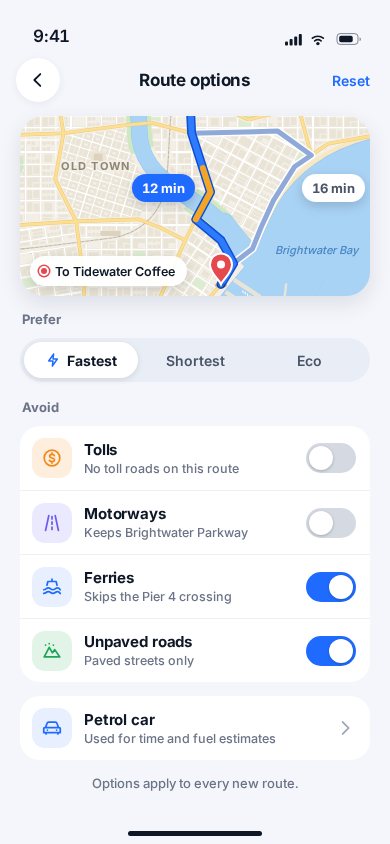
Atlas is a complete maps and navigation app for an invented city: onboarding, location access, a full screen map with search and category chips, results, place pages with photos and reviews, directions by car, transit, bike and foot, turn by turn navigation with lane guidance, transit steps and live departures, saved lists, recents, offline areas, live location sharing, reports, profile and settings. A warm drawn map under white sheets, with one vivid blue and a deep green turn banner.
| Detail | Value |
|---|---|
| Screen type | Settings |
| App | Atlas: Maps and navigation |
| Category | Travel |
| Design language | Minimal, light |
| Type | Inter |
| Colours | #f4f6fb background, #ffffff surface, #0e1726 text, #6b7486 text-muted, #1f6bff accent, #ffffff accent-contrast, #0c5a43 secondary, #e6e9f0 border, #e5484d danger |
What this screen says
- Route options
- Reset
- 12 min
- 16 min
- To Tidewater Coffee
- Prefer
- FastestShortestEco
- Avoid
- TollsNo toll roads on this route
- MotorwaysKeeps Brightwater Parkway
- FerriesSkips the Pier 4 crossing
- Unpaved roadsPaved streets only
- Petrol carUsed for time and fuel estimates
- Options apply to every new route.
Around it in Atlas
More settings screens
- Omnia Settings: Super app for rides, food and payments
- Staya Settings: Homes and stays from local hosts
- Lodge Settings: Hotels, deals and reservations
- Fare Settings: Flight search and price alerts
- Rove Settings: Reviews and things to do
- Ignition Settings: Car rental from local hosts
- Contrail Settings: Airline booking, check-in and boarding
- Keycard Settings: Hotel stays, digital key and room service
- Detour Car icon: Community driving navigation
- Convoy Settings: Carpooling between cities
- Manifest Settings: Trip plans from your confirmation emails
- Roadster Settings: Your electric car, from your phone
Every travel app settings screen
What makes a good settings screen
- Group options into clear sections. Account, notifications, privacy, appearance and help, with headings, so people scan to the right group.
- Label settings by their effect. "Daily reminder at 8:00" is clearer than "Reminders". Add a short description under options that need one.
- Use the right control. Toggles for on and off, a row that opens a list for choices, and sliders only for ranges.
- Apply changes immediately. Most mobile settings take effect when changed, with no Save button to forget.
The full settings screen guide and every example
Remix Atlas free: describe your own app and it is drawn in this design. Or get its files from $10: Figma, React Native, SwiftUI, Flutter and HTML.