Templates · Settings screens · Travel app · Lodge
Lodge Settings screen
A settings screen from Lodge, a travel app template in an Enterprise style. Screen 25 of 25.
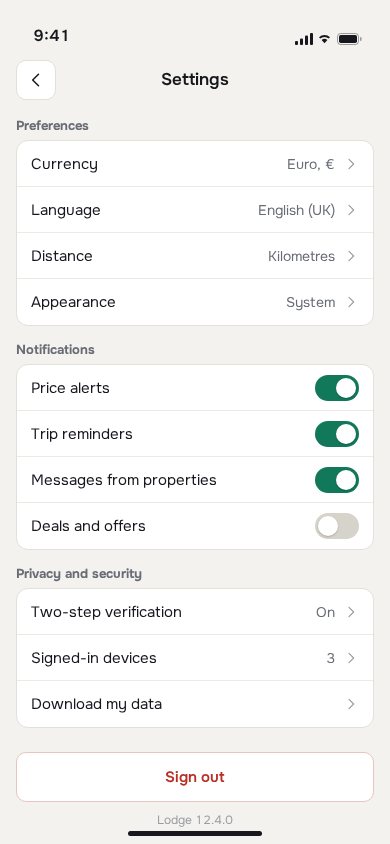
Lodge is a complete hotel booking app: welcome and sign in, a home with the search card and Circle deals, destination search, a date and guest picker, results with sort, filters and a price map, a hotel page with photos, reviews and room choices, guest details, payment and a confirmation, trips, a booking with directions, a chat with the property, saved lists, Lodge Circle membership, travel stats, notifications, account and settings. Warm grey and white with deep claret, green and gold.
| Detail | Value |
|---|---|
| Screen type | Settings |
| App | Lodge: Hotels, deals and reservations |
| Category | Travel |
| Design language | Enterprise, light |
| Type | Onest |
| Colours | #f3f2ee background, #ffffff surface, #16181d text, #686c75 text-muted, #9e1b3c accent, #ffffff accent-contrast, #11795a secondary, #e2e0d9 border, #d0362b danger |
What this screen says
- Settings
- Preferences
- Currency Euro, €
- Language English (UK)
- Distance Kilometres
- Appearance System
- Notifications
- Price alerts
- Trip reminders
- Messages from properties
- Deals and offers
- Privacy and security
- Two-step verification On
- Signed-in devices 3
- Download my data
- Sign out
- Lodge 12.4.0
Around it in Lodge
More settings screens
- Jaunt Settings: Bus, train and flight booking
- Spoke Settings: Bike sharing
- Navara Settings: Yacht charter
- Voya Settings: Travel booking
- Wheelhouse Settings: Driver app for ride hailing
- Fuelup Settings: Pay at the pump and car wash
- Omnia Settings: Super app for rides, food and payments
- Staya Settings: Homes and stays from local hosts
- Fare Settings: Flight search and price alerts
- Rove Settings: Reviews and things to do
- Ignition Settings: Car rental from local hosts
- Contrail Settings: Airline booking, check-in and boarding
Every travel app settings screen
What makes a good settings screen
- Group options into clear sections. Account, notifications, privacy, appearance and help, with headings, so people scan to the right group.
- Label settings by their effect. "Daily reminder at 8:00" is clearer than "Reminders". Add a short description under options that need one.
- Use the right control. Toggles for on and off, a row that opens a list for choices, and sliders only for ranges.
- Apply changes immediately. Most mobile settings take effect when changed, with no Save button to forget.
The full settings screen guide and every example
Remix Lodge free: describe your own app and it is drawn in this design. Or get its files from $10: Figma, React Native, SwiftUI, Flutter and HTML.