Templates · Detail screens · Travel app · Atlas
Atlas Directions screen
A detail screen from Atlas, a maps and navigation app template in a Minimal style. Screen 10 of 25.
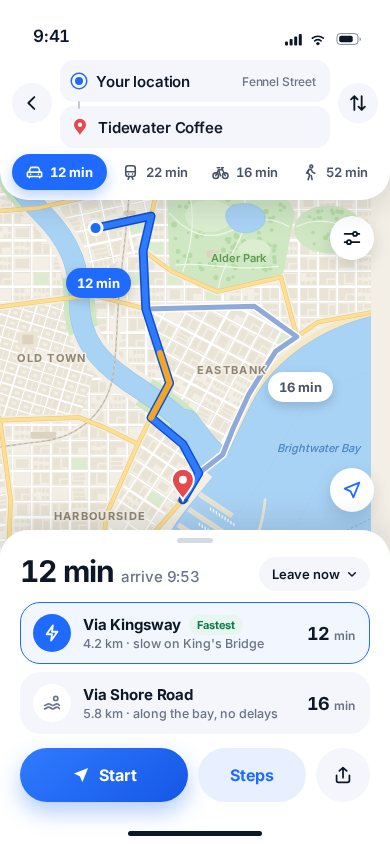
Atlas is a complete maps and navigation app for an invented city: onboarding, location access, a full screen map with search and category chips, results, place pages with photos and reviews, directions by car, transit, bike and foot, turn by turn navigation with lane guidance, transit steps and live departures, saved lists, recents, offline areas, live location sharing, reports, profile and settings. A warm drawn map under white sheets, with one vivid blue and a deep green turn banner.
| Detail | Value |
|---|---|
| Screen type | Detail |
| App | Atlas: Maps and navigation |
| Category | Travel |
| Design language | Minimal, light |
| Type | Inter |
| Colours | #f4f6fb background, #ffffff surface, #0e1726 text, #6b7486 text-muted, #1f6bff accent, #ffffff accent-contrast, #0c5a43 secondary, #e6e9f0 border, #e5484d danger |
What this screen says
- 12 min
- 16 min
- Your locationFennel Street
- Tidewater Coffee
- 22 min
- 52 min
- 12 min arrive 9:53
- Leave now
- Via KingswayFastest4.2 km · slow on King's Bridge
- Via Shore Road5.8 km · along the bay, no delays
- Start
- Steps
Around it in Atlas
More detail screens
- Roamly Destination: Trips, stays and experiences
- Jaunt Destination: Bus, train and flight booking
- Spoke Station: Bike sharing
- Navara Yacht: Yacht charter
- Voya Trip: Travel booking
- Wheelhouse Trip request: Driver app for ride hailing
- Fuelup Station: Pay at the pump and car wash
- Omnia Restaurant: Super app for rides, food and payments
- Staya Listing: Homes and stays from local hosts
- Lodge Hotel: Hotels, deals and reservations
- Fare Flight: Flight search and price alerts
- Rove Attraction: Reviews and things to do
Every travel app detail screen
What makes a good detail screen
- Lead with what identifies the item. A large image or title, the price or status, and the key facts at the top. People should know they are in the right place at a glance.
- Keep the main action visible. A sticky bottom button for Add to cart, Book or Play stays reachable while people scroll through details.
- Order information by importance. The facts that decide the choice come first; reviews, specifications and fine print further down.
- Use progressive disclosure. Long descriptions, specifications and policies can expand on tap rather than filling the screen.
The full detail screen guide and every example
Remix Atlas free: describe your own app and it is drawn in this design. Or get its files from $10: Figma, React Native, SwiftUI, Flutter and HTML.